
Free invoice template
Free Property Maintenance Invoice Template
One worksheet from business details through the balance due. Open it in Excel or Google Sheets for automatic totals, or use the blank fillable invoice template PDF for a quick invoice in the office or on the jobsite.
Best for: Property maintenance businesses, facilities teams, and contractors billing owners or property managers for site work.
Want to see one filled in? Download a completed sample invoice .
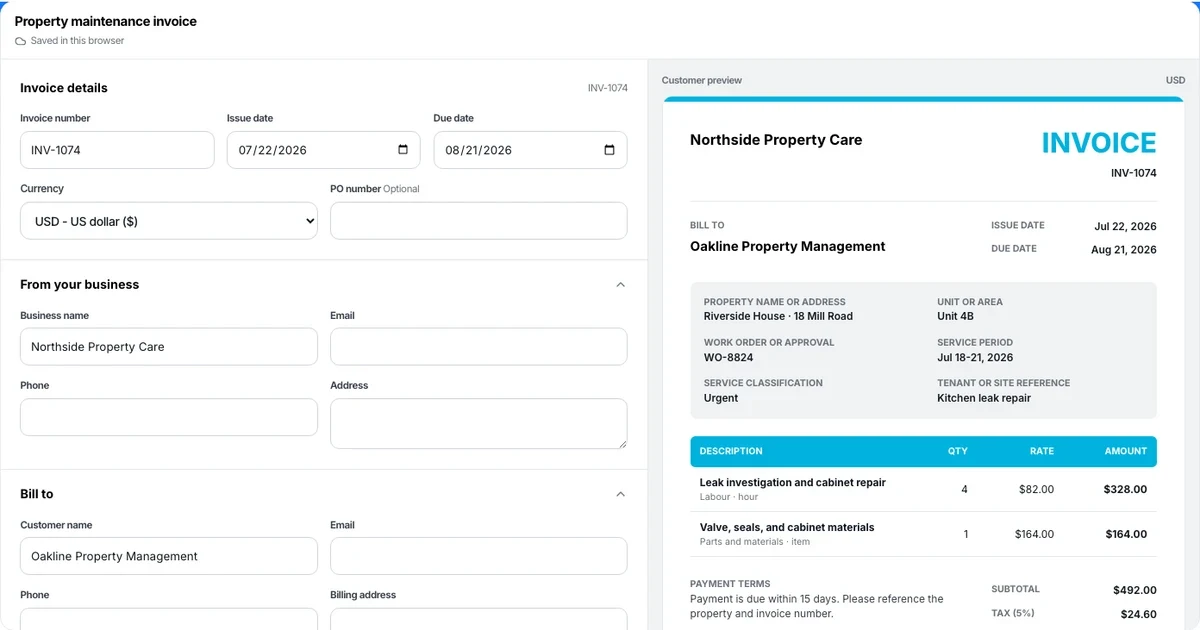
Prefer to build it online and export a finished PDF? Use the online invoice generator .
Workforce management for shift-based teams
Time Tracking • Shift Scheduling • Time Off Management
Free 14-day trial · No credit card required
Download the property maintenance invoice template in Excel or PDF
The property maintenance invoice template bills recurring or one-off work on one sheet: business and customer details, property and work-order reference, line items for labor and materials, then automatic subtotal, tax, total, and balance due.
Download it once and reuse it for every job — no account, no email address, and nothing to install. Prefer to build the invoice in your browser and export a finished PDF? Use the online invoice generator .
What’s inside the property maintenance invoice template
- Property, unit, and work-order reference fields
- Editable line items for labor, materials, and per-unit charges
- Automatic line amounts, subtotal, tax, total, and balance due
- Space for recurring-service terms and payment methods
How to fill out the property maintenance invoice template
- Download. Choose Excel for automatic calculations or the fillable PDF for a quick manual invoice.
- Fill in the invoice. Replace the highlighted cells, edit the line items, and enter the quantities and rates.
- Review and send. Confirm the totals, balance due, and terms, then print or export the invoice as a PDF for the customer.
What to include on a property maintenance invoice
- Add your business and the customer. Enter your business name, contact details, and license, then the customer name, billing address, invoice number, and issue and due dates.
- Itemize the work. List labor, materials, per-unit charges, and work-order items with a quantity, rate, and automatic line amount.
- Apply tax, deposits, and payments. Set the tax rate, subtract any deposit or amount already paid, and show the remaining balance due.
- Set payment terms. State the due date, accepted payment methods, and any deposit or late-payment terms.
- Review and send. Check the customer-facing totals on the property maintenance invoice, then print or export the finished PDF.
The online generator, spreadsheet, and PDF follow this same sequence. Choose the format that fits the job; the customer-facing invoice should contain the same work, quantities, price, and terms.
Excel, Google Sheets, or PDF: which format should you use?
- Excel
- Edit and auto-calculate. Totals update as you change quantities, rates, the tax rate, and any deposit or amount paid.
- Google Sheets
- Upload the XLSX to Google Drive to fill it out in any browser and share it with the office. The formulas carry over.
- Fillable PDF
- A one-page form for a fast invoice in the office or on the jobsite. Type into the fields or print it — no calculations.
Property maintenance invoice template FAQ
Is the property maintenance invoice template really free?
Yes. The Excel workbook and fillable PDF can be downloaded without creating an account or providing an email address.
Does the Excel invoice template calculate totals?
Yes. The workbook calculates each line amount, subtotal, tax, total, and balance due. Review the quantities, rates, tax rate, and any deposit or amount paid before sending the invoice.
Can I open the template in Google Sheets?
Yes. Upload the XLSX file to Google Drive and open it with Google Sheets. The formulas carry over; confirm the print layout and number formats after conversion.
What line items are on the property maintenance invoice?
The invoice has editable rows for the labor, materials, and charges specific to a property maintenance job. Each row has a quantity, rate, and automatic line amount, and the sheet totals the subtotal, tax, total, and balance due. Add, rename, or delete rows to match the work.
Can I customize the property maintenance invoice template with my logo and business details?
Yes. In Excel or Google Sheets, edit the business name, address, and contact cells and add a logo from the Insert menu. The fillable PDF has business and contact fields you type into before printing or sending.
What is the difference between an estimate, a quote, and an invoice?
An estimate is an approximate price before work starts. A quote is a fixed price the customer can accept. An invoice requests payment for work already delivered and shows what has been paid and the balance due. This template produces an invoice.
Explore more free tools
Property Maintenance Invoice Generator
Create an invoice for a payer, property, work order, service period, labor, and materials.
Work Order Template
Fill in the job details, add your tasks and materials, and download a branded work order PDF to hand the crew before the job starts.
Statement of Account Generator
Turn invoices, payments, credits, and adjustments into a customer account statement.
Invoice Generator
Create, preview, and download a professional invoice PDF without an account.
Contractor Invoice Generator
Invoice labor, materials, equipment, and project stages in a customer-ready PDF.
Construction Invoice Generator
Create progress, deposit, change-order, or final invoices and export a customer-ready PDF.