How Do I Correct an Invoice After Sending It?
Correct an invoice after sending it by preserving the original, choosing a replacement invoice or credit note, and reconciling payments and the new balance.
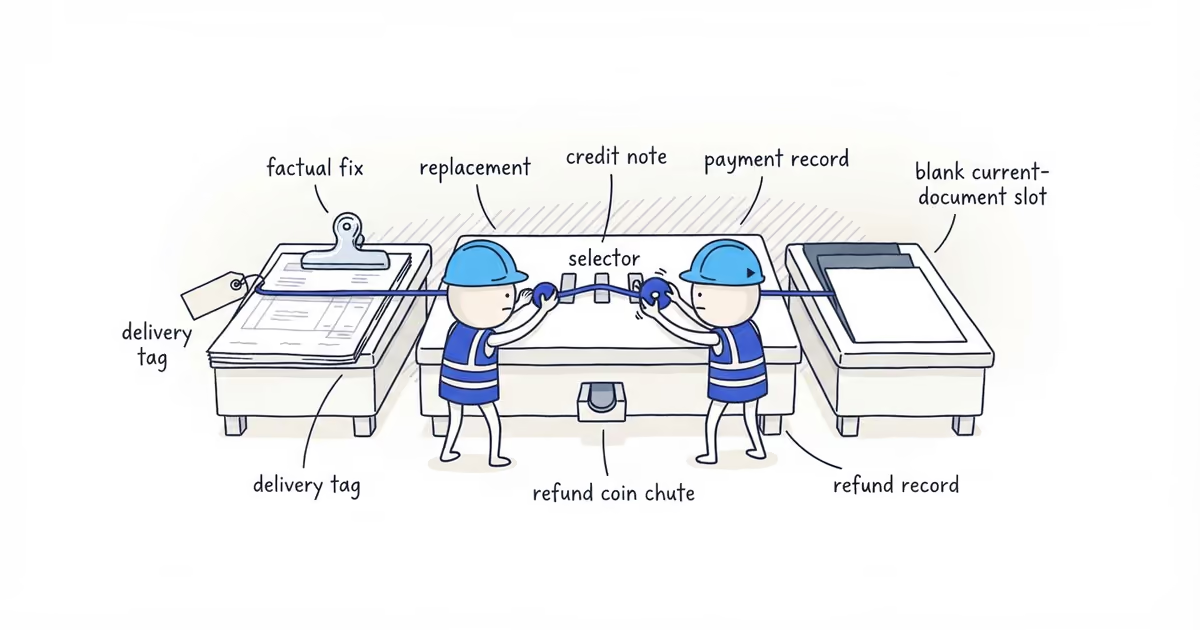
To correct an invoice after sending it, preserve the sent invoice and its delivery record. Do not delete or overwrite it. Record the error and the correct fact or approved amount, then choose the matching correction route.
The five routes are a non-financial correction, a corrected or replacement invoice, a partial or full credit note, a payment-record correction, and a refund record. They do different jobs; mixing them creates balances nobody can reproduce.
What to check before correcting a sent invoice
Create a short correction intake before changing the customer record:
| Record now | What to capture |
|---|---|
| Original document | Number, date, delivered PDF, delivery record, customer, and job |
| Starting balance | Original total, prior credits, payments, and open balance |
| Exact error | The field, charge, payment, or refund record that is wrong or missing |
| Correct evidence | Approved job record, payment receipt, refund transaction, or other source record |
| Correction control | Date found, owner, selected route, and new document or transaction reference |
If the fact or approval is disputed, stop. A correction records a settled fact; it does not decide a scope, quality, pricing, or approval dispute. When the disagreement concerns extra work or a concealed condition, the change-order communication guide helps you organize the original scope, evidence, impact, and customer choices before correcting any document.
How to use the Invoice Correction Decision Tree
Ask whether the invoice itself is wrong. If not, leave its charge alone and check payment or refund records. If it is, ask whether the billed amount changes and whether the document can remain current.
| Route | Use it when | Create or update | Do not do |
|---|---|---|---|
| Non-financial correction | A name or contact typo, address format, job reference, or description is wrong, but the customer, charge, payments, and balance stay the same | A correction notice or corrected copy linked to the original, stating what changed and what did not | Change the ledger for a factual typo |
| Corrected or replacement invoice | The customer or job is wrong, a material error exists, or an approved omitted charge increases the bill | A linked replacement using the established revision method; mark the original superseded and carry forward valid payments and credits | Delete the original or use a replacement to create missing approval |
| Partial or full credit note | The issued amount must be reduced or the amount still available must be cancelled | A linked credit note showing the item, reason, prior credits, this credit, and post-credit invoice balance | Increase the bill or claim money was refunded |
| Payment-record correction | The charge is right, but a deposit, card, check, ACH, or cash payment was omitted, duplicated, or applied to the wrong invoice | The corrected payment application and an updated receipt or account view when useful | Change the invoice total to force the balance |
| Refund record | Money has actually been returned | Amount, date, method, transaction reference, and invoice or credit-note reference | Treat a credit or payment correction as proof that money moved |
A partial credit reduces part of the invoice. A full credit cancels everything available after prior credits and should leave a zero post-credit invoice balance. Neither proves a refund was sent.
A refund record documents money after it moves; it does not decide whether a refund is owed.
An upward correction does not use a credit note. Verify the omitted amount and approval, then use the established corrected, replacement, or additional-invoice process. Carry forward valid payments and credits.
Document and numbering rules may differ. This tree classifies the operating problem; it is not tax, accounting, or legal advice.
Partial invoice credit example with a $300 correction
These are fictional inputs, not accounting guidance. The invoice has a duplicated $300 line, a prior $200 credit, and a correctly recorded $1,000 payment.
First calculate the post-credit invoice balance:
| Invoice and credit record | Amount |
|---|---|
| Original invoice | $2,400 |
| Prior credit | -$200 |
| Current partial credit | -$300 |
| Post-credit invoice balance | $1,900 |
$2,400 - $200 - $300 = $1,900
Then use the separate payment record to calculate the open customer balance:
| Balance and payment record | Amount |
|---|---|
| Post-credit invoice balance | $1,900 |
| Payment already received and recorded | -$1,000 |
| Open customer balance | $900 |
$1,900 - $1,000 = $900
The credit note explains the $1,900 invoice value. The payment ledger explains the $900 open balance. Do not call both “remaining balance.”
What to tell a customer after correcting an invoice
Send one handoff with the old and new references, reason, amount changed, current balance, and required action.
We corrected invoice [original number] because [specific error]. [Correction, credit note, or replacement number] changes the balance from $[old balance] by $[correction amount]. The current balance is $[new balance]. Please use [current document/reference] for payment. [No action is needed / please replace the earlier copy in your records].
Mark which document is current. “Duplicate disposal line credited” is useful; “invoice updated” is not.
When to use a credit note for an invoice correction
When the tree selects a partial or full credit, the ShiftFlow Credit Note Generator records the credit-note and original-invoice numbers and dates, type, reason, credited items, original total, prior credits, current credit, and remaining invoice balance. It provides preview, print, and PDF output.
The tool caps the current credit at the invoice amount available after prior credits. It also warns when a full credit still leaves a balance. The PDF does not send a refund, post the correction into another system, fix a payment record, or replace the original invoice for you.
What records to keep after an invoice correction
Keep the original, intake, correction, approval evidence, payments, any refund transaction, delivery records, and customer message together. IRS Publication 583 identifies invoices among supporting business documents. Another person should be able to reconstruct the correction without asking what you remember.
Invoice correction checklist before resending
The correction is complete when:
- the sent original and delivery record still exist;
- the exact error, correct evidence, owner, date, and correction route are recorded;
- the correction or replacement references the original;
- credits and payments reproduce their own balances separately;
- the customer has one clearly identified current document and balance; and
- any money actually returned has a separate refund transaction record.
If two documents still appear current or the $900 open balance cannot be rebuilt from the invoice, credits, and payment record, the correction is not finished.
Frequently asked questions
Can I correct an invoice after the customer has paid?
Yes. Preserve the original invoice and payment record, then determine whether the invoice amount is wrong or the payment was posted incorrectly. If the corrected amount creates money to return, document any refund separately after it is actually sent.
What if I find another error after issuing a corrected invoice?
Preserve every issued version and create the next linked correction under your established revision method. Tell the customer which document is current and rebuild the balance from the original, credits, payments, and any refund record.
Sources
- ShiftFlow Credit Note Generator, current tool page and implementation.
- IRS Publication 583: Starting a Business and Keeping Records, Internal Revenue Service.
- pricing
- how-to-correct-invoice-after-sending
- how-to-correct-an-invoice-after-sending
- corrected-invoice
- invoice-correction
- credit-note-for-invoice-correction