How Often Should Contractors Post on Social Media?
Find how often contractors should post on social media with a capacity-based schedule that protects content quality, customer replies, and job results.
Contractors should post on social media as often as the business can produce usable job content, check it properly, and respond to the people it reaches. The right number is the highest frequency your crew can maintain without rushed posts, skipped approvals, or unanswered inquiries. There is no single weekly number that fits every contractor or every social channel.
Last verified: August 27, 2026 (United States).
Work out the number separately for each channel you have already chosen to use. Facebook, Instagram, and TikTok do not need matching schedules. If you reuse one job across channels, allow time to prepare and review each version.
Once Facebook has a sustainable slot count, the Facebook post ideas guide helps fill it from completed work, customer questions, local context, and real availability. Once Instagram has its own slot count, the Instagram content guide helps choose the least burdensome format for each approved asset.
How to Calculate Social Media Posting Frequency
Use the last four weeks of real work, not the number of posts you hope to publish.
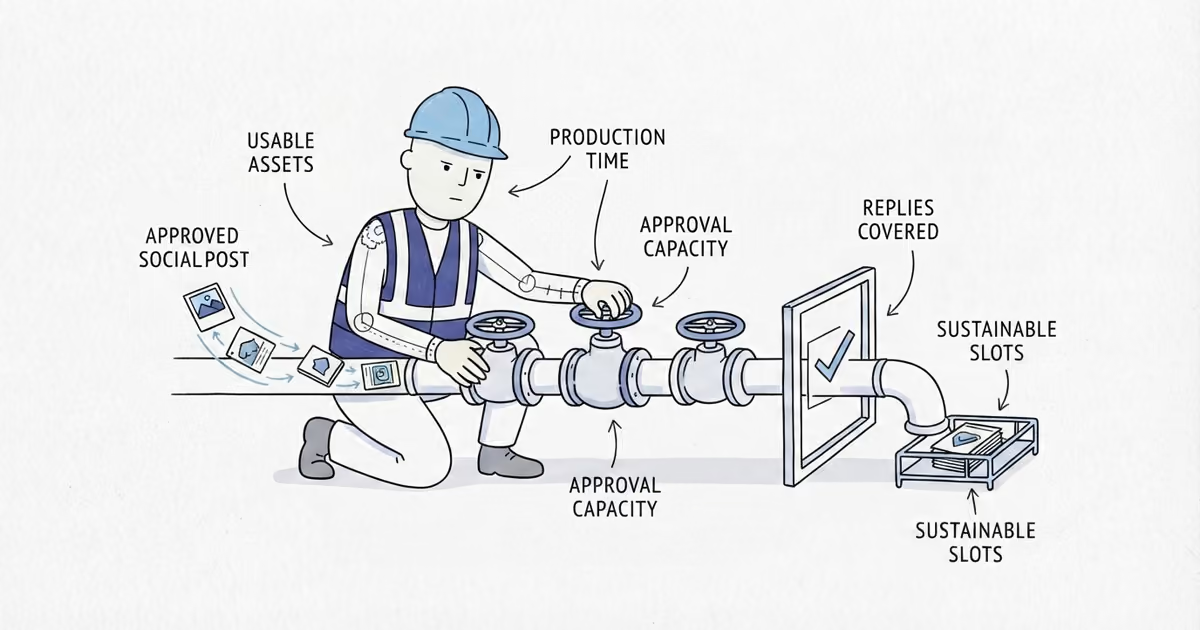
First, count only usable assets assigned to this channel. An asset might be one finished-job photo set or one short clip, but it counts only if the customer permission and privacy review are complete and the material is good enough to publish. Ten random camera-roll photos are not ten usable posts.
Then fill in these three numbers:
| Capacity check | Calculation |
|---|---|
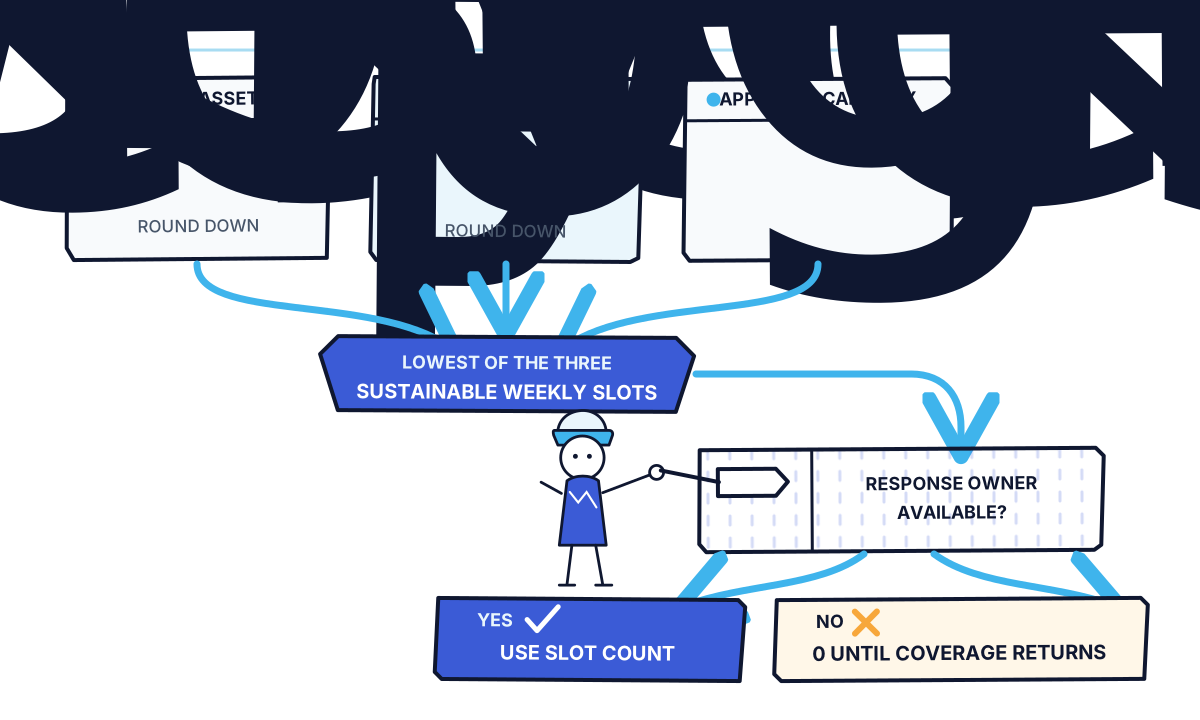
| Usable-asset capacity | Usable assets from the last four weeks / 4, rounded down |
| Production-time capacity | Real marketing minutes available each week / full minutes needed per post, rounded down |
| Approval capacity | Number of posts the owner or assigned reviewer can check each week |
The production estimate must include choosing the asset, editing it, writing the caption, checking facts and privacy, getting approval, scheduling the post, and recording its source. Do not count only the five minutes spent typing.
Now apply the formula:
Sustainable weekly slots = the lowest of usable-asset capacity, production-time capacity, and approval capacity.
There is one final gate: someone must be available to monitor comments, direct messages, calls, or forms within the response standard your business promises. If nobody owns the response, the safe capacity is zero until coverage returns.
This is an operating rule for your business, not a recommendation from a social platform.
How to Set a Contractor Social Media Posting Schedule
A single schedule will break as soon as estimates pile up or the crew hits a busy stretch. Write down three modes before that happens.
- Normal mode: Use the sustainable weekly slots from the formula.
- Busy-week mode: Recalculate with the time and approval capacity you can protect during a busy but ordinary week. The lower result becomes the minimum schedule.
- Pause and recovery: Do not publish when customer permission is unclear, the work cannot be checked, or nobody can respond. Clear the review or response backlog, rebuild a small supply of usable assets, and recalculate before restarting.
Pausing is better than publishing private customer details, presenting unfinished work as complete, or inviting inquiries that sit unanswered.
A Contractor Social Media Posting Schedule Example
Northside Painting wants a workable Instagram schedule. During the previous four weeks, the team collected 11 permission-cleared, post-ready job assets for Instagram.
- Usable-asset capacity:
11 / 4 = 2posts per week after rounding down. - Production-time capacity: The owner can protect 80 minutes per week, and each post takes 30 minutes from selection through source tracking.
80 / 30 = 2after rounding down. - Approval capacity: The owner can review three posts per week.
- Response gate: The office manager monitors messages and inquiries on working days, with the owner as backup.
The lowest capacity is two, so Northside’s normal mode is two Instagram posts per week. That is not a recommendation for painting companies. It is the result of Northside’s inputs.
During busy weeks, only 35 minutes and one approval slot are protected. Northside’s busy-week mode is one post. If both the office manager and owner are unavailable, or a job’s customer permission is unresolved, the account enters pause and recovery mode.
How to Track Social Media Posts and Customer Outcomes
Run the calculated schedule for four weeks before changing it. Add a simple source field to each inquiry record so the team can record Facebook, Instagram, TikTok, another source, or unknown. Keep unknown as unknown; do not credit social media just because an inquiry arrived after a post.
Northside’s first scorecard looks like this:
| Week | Scheduled | Published | Time spent | Qualified inquiries | Estimates | Won jobs | Response backlog |
|---|---|---|---|---|---|---|---|
| 1 | 2 | 2 | 61 min | 0 | 0 | 0 | 0 |
| 2 | 2 | 2 | 58 min | 1 | 1 | 0 | 0 |
| 3 | 2 | 2 | 63 min | 2 | 1 | 1 | 0 |
| 4 | 2 | 2 | 60 min | 1 | 1 | 0 | 0 |
| Total | 8 | 8 | 242 min | 4 | 3 | 1 | 0 |
Facebook’s Help Centre confirms that Page posts can be scheduled and managed in advance. Instagram’s Help Centre and TikTok Support describe their native insights and analytics. Those tools can show whether content was delivered or received interaction. They do not show, by themselves, that a local viewer became a qualified inquiry, estimate, or won job. Keep those outcomes in the business’s own scorecard.
When Contractors Should Post More or Less on Social Media
Use the worksheet again at the end of the test. Do not add posts because one received more views.
Hold the cadence when the scheduled work was published, time stayed within the budget, approvals and responses were covered, the content supply did not run dry, and the channel produced a useful customer outcome. Northside should hold at two posts. It won a job, but its asset and production capacities still top out at two.
Increase by one weekly slot only when a fresh calculation supports the extra slot, the next posts are already backed by usable assets, the reviewer and response owner have room, and the existing cadence has produced qualified inquiries, estimates, or won jobs. If one condition fails, hold.
Reduce the cadence to the new calculated minimum when posts are repeatedly rushed or missed, approvals are skipped, usable assets run out, or messages and inquiries form a backlog. If tracking is reliable but the four-week test produces no qualified customer outcome, do not increase frequency. Move to busy-week mode while you separately review whether the channel is worth the time.
Reach, views, and interactions can help diagnose what happened on the platform. They are not customer results. The useful chain is qualified inquiry, estimate, won job.
If your current schedule is already inconsistent, stop carrying overdue posts forward. Count the usable assets you have now, reserve time you can actually protect, name the reviewer and response owner, run the formula for each channel, and restart at that number.
Frequently Asked Questions About Contractor Social Media Posting
Should contractors schedule social media posts in advance?
Yes, when scheduling helps protect the cadence already supported by the worksheet. Facebook Pages offer native scheduling, but a queued post still needs approval and a person assigned to replies.
Who should approve a contractor’s social media posts?
Name one owner or reviewer who can confirm job facts, customer permission, privacy, and the working contact route. Assign a backup; do not assume whoever notices the post will handle it.
Sources
- local-platform-decisions
- how-often-should-contractors-post-on-social-media
- contractor-social-media-posting-schedule
- social-media-posting-frequency-for-contractors
- sustainable-social-media-schedule
- schedule-social-media-posts-in-advance