How Do I Add LocalBusiness Schema?
Learn how to add LocalBusiness schema with a verified entity map and JSON-LD example, validate it, and avoid creating false entities for service areas.
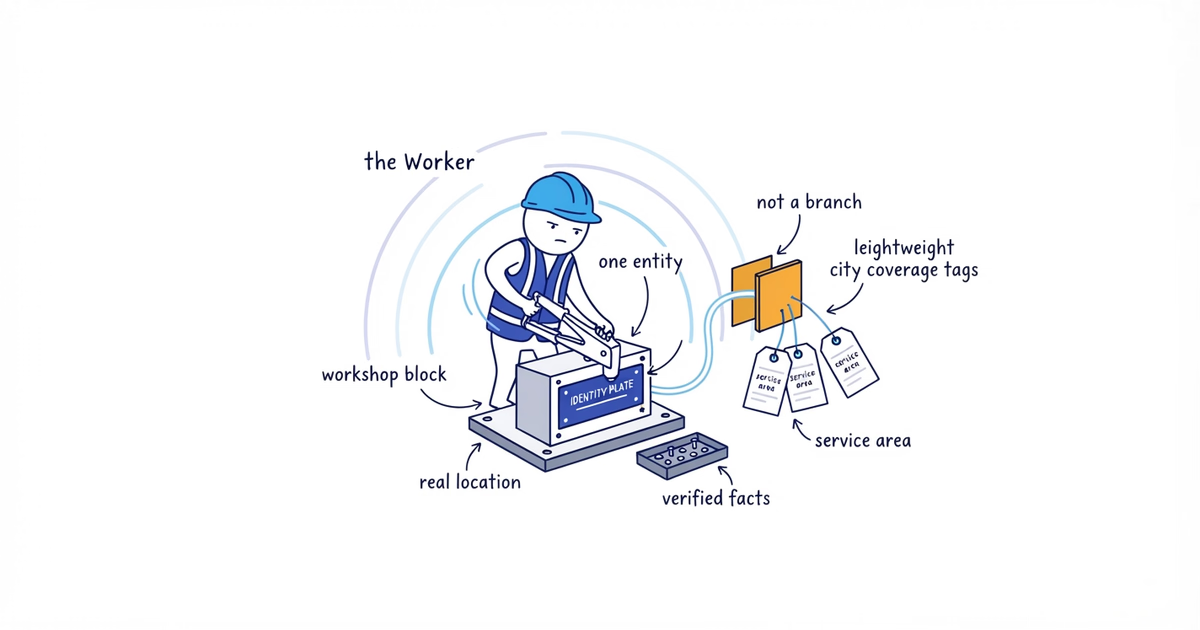
To add LocalBusiness schema, first decide whether the page represents a real physical business location. If it does, add one LocalBusiness object for that location, use the most-specific truthful subtype, and fill it from verified business records. If the page only represents a city you serve, do not create another business entity for it.
That gives a service business three possible outcomes:
| Your operating model | What to implement |
|---|---|
| One real staffed location with a publishable address | Add one location entity using the real address and a page that describes that location. |
| One service-area business based at a private or hidden address | Do not expose or invent an address to complete Google’s LocalBusiness template. Review the site’s broader business-wide Organization or entity markup with the developer. |
| Several real staffed locations | Give each real location its own fact record, location page, and LocalBusiness object. Do not create extra entities for the other cities each location serves. |
Google’s current LocalBusiness documentation requires the business name and its physical address for that Google search feature. It also says to define each local business location and use the most-specific subtype possible. The unit is the real location, not the keyword page.
Last verified: August 12, 2026 (United States).
By the end of this job, you should have an entity map, an approved location fact sheet, one JSON-LD object for each eligible location, and a record of what passed each test. A valid outcome can also be: do not implement Google’s LocalBusiness feature because we cannot supply the required physical address truthfully.
The examples below use fictional Clearline Plumbing, an instructional domain, a sample phone number, and placeholder location details. None is a real business claim.
1. Classify the real-world entity
Input: Your operating model, physical bases, staffing, customer access, address-publication decision, and complete list of website pages about locations and cities.
Action: Put every relevant URL into one of these classes:
URL | What it represents | Real separate physical location? | DecisionFor Clearline, the result might be:
| URL | What it represents | Separate location? | Decision |
|---|---|---|---|
/locations/austin | Staffed Austin business location | Yes | Add one location entity |
/round-rock-plumber | Jobs served from the Austin operation | No | No separate LocalBusiness |
/cedar-park-plumber | Jobs served from the Austin operation | No | No separate LocalBusiness |
Round Rock and Cedar Park can be genuine service areas without being Clearline locations. Their pages may help customers confirm coverage, but changing the city name does not create a new branch, office, address, crew, or business entity.
The same rule applies when a plumber works from home and hides that address from customers. Do not enter Austin, TX where a street address belongs. Do not rent a mailbox or virtual office for the markup. Do not reveal a private home address solely to make a structured-data test turn green.
In that hidden-address case, stop this Google LocalBusiness implementation. Ask whoever owns the site’s technical SEO to review whether a truthful business-wide Organization entity already exists. Broader Schema.org vocabulary and Google’s documented LocalBusiness rich-result requirements are not the same contract.
Output: A URL-to-entity map marked add location entity, review business-wide entity, or no separate entity.
Done when: Every proposed LocalBusiness object points to one real physical location. No served city has become a branch by default.
If this fails: Resolve the operating model first. Code cannot settle whether a location exists.
2. Build the location fact sheet
Input: Approved business records and the current location, contact, footer, and booking pages.
Action: Create one fact sheet for each eligible location:
Entity status: eligible physical location / hidden service-area base / not separate
Canonical page URL: ___________________________________________
Stable @id: ___________________________________________________
Real-world business name: _____________________________________
Most-specific Schema.org subtype: ______________________________
Physical address: _____________________________________________
Primary location phone: _______________________________________
Customer-facing hours: ________________________________________
Areas actually served: ________________________________________
Where each included fact appears on the website: ______________
Record owner and last checked: _________________________________
Use the narrowest type that truthfully describes the business. For a plumbing business, Plumber is more useful than the generic LocalBusiness. It describes what the business is. Individual services such as drain clearing and water-heater repair do not each need a business type.
The address must be the physical location of the business. A target city, P.O. box, rented mailbox, virtual office, or job site is not a substitute. If the business is prepared to publish a genuine location but the website shows an old address, stop and correct the source records before writing code.
Optional properties still need evidence. Include a phone only when it reaches that business or location. Include hours only when they describe the location accurately. Do not turn after-hours voicemail into Open 24 hours.
Output: One approved fact sheet per eligible location.
Done when: Every included value has a named source, and the visible website does not contradict it.
If this fails: Omit an unverified optional field. If the physical address cannot be supplied truthfully and published appropriately, accept that this implementation is not eligible under Google’s LocalBusiness template.
3. Assign the page, subtype, and identity
Input: The entity map, approved fact sheet, canonical URLs, and any structured data already emitted by the website.
Action: Decide where one source will create the object.
Put location markup on the canonical page that actually describes the location. Give the entity a stable @id based on that canonical URL:
https://www.example.com/locations/austin#businessThe @id is an identifier, not another page customers need to visit. Keep it unchanged while the same entity and canonical URL remain in use.
Before adding anything, inspect the rendered page for existing Organization, LocalBusiness, or trade-specific objects. SEO plugins, themes, page builders, and custom components can each generate structured data. Adding a second block without checking can leave two names, addresses, or phones describing what is supposed to be one business.
For the Clearline example:
/locations/austinownshttps://www.example.com/locations/austin#businesswith the subtypePlumber./round-rock-plumberdoes not receive#round-rock-businessbecause Clearline has no Round Rock location./cedar-park-plumberdoes not receive#cedar-park-businessfor the same reason.
Output: One implementation specification for each eligible location, including the page, type, @id, and component or plugin that owns the output.
Done when: One stable identifier maps to one real location and one code path emits it.
If this fails: Do not stack another block on top. Decide whether the plugin, theme, or custom code will own the entity, then reconfigure the other source.
4. Add LocalBusiness schema with JSON-LD
Input: The approved fact sheet and implementation specification.
Action: Adapt this object for one genuine plumbing location. Replace every placeholder and remove optional properties you cannot verify.
{
  "@context": "https://schema.org",
  "@type": "Plumber",
  "@id": "https://www.example.com/locations/austin#business",
  "name": "Clearline Plumbing",
  "url": "https://www.example.com/locations/austin",
  "telephone": "+1-512-555-0100",
  "address": {
    "@type": "PostalAddress",
    "streetAddress": "[real publishable street address]",
    "addressLocality": "Austin",
    "addressRegion": "TX",
    "postalCode": "[real postal code]",
    "addressCountry": "US"
  },
  "areaServed": [
    {
      "@type": "City",
      "name": "Austin"
    },
    {
      "@type": "City",
      "name": "Round Rock"
    },
    {
      "@type": "City",
      "name": "Cedar Park"
    }
  ]
}
Pass the finished object to the CMS, plugin, template, or site helper that serializes JSON-LD. Do not leave square-bracket placeholders in production.
Schema.org allows areaServed to describe an administrative area, place, shape, or text. Here it says the Austin operation serves those cities. It does not say Clearline has a location in each city. It does not configure the service area in Google Business Profile, prove eligibility for Google’s LocalBusiness result, or improve a ranking by itself.
Do not add review or aggregateRating to chase stars for testimonials on the business’s own site. Google’s current review-snippet rules say pages using LocalBusiness or another Organization type are ineligible for the star review feature when the entity controls reviews about itself. That includes reviews shown through an embedded third-party widget.
Output: One review-ready JSON-LD object per eligible location.
Done when: A comparison against the fact sheet finds no placeholder, stale detail, false office, private address, copied rating, or cloned city entity.
If this fails: Delete unsupported optional properties. If deleting a false or private address removes Google’s required physical address, stop the feature instead of replacing it with a city name.
5. Match the markup to the visible page
Input: The review-ready object and the page customers can see.
Action: Read the object line by line beside the page.
The visible Austin page should identify Clearline Plumbing, describe the Austin location, and show the public contact and location facts included in the object. If the schema says the location is open Saturday, customers should be able to find that current information on the site. If the site intentionally keeps a home address private, the JSON-LD should not become a hidden way to expose it.
Google’s structured-data guidelines require markup to be a true representation of the page and warn against hidden, irrelevant, or misleading content. A parser cannot make that judgment for the owner.
Do not add content merely to feed the markup. Add a fact when it helps a customer understand or contact the real location. Otherwise remove the optional property from the object.
Output: A markup-to-page comparison with each property approved, corrected, or removed.
Done when: The object and the page describe the same real business location without exposing information the business keeps private.
If this fails: Fix the source record and visible page, or remove the disputed property. Do not use JSON-LD as a private fact store.
6. Run two different validation tests
Input: The final object or staging URL, Schema Markup Validator, and Rich Results Test.
Action: Record the two results separately:
SCHEMA.ORG VALIDATION
Detected type: ________________________________________________
Errors: _______________________________________________________
Warnings and decisions: _______________________________________

GOOGLE RICH RESULTS TEST
Detected Google feature/item: _________________________________
Errors: _______________________________________________________
Warnings and decisions: _______________________________________
Factual review completed by: __________________________________
Use Schema Markup Validator to check the broader vocabulary and object structure. Then use Rich Results Test to see whether Google detects a supported feature and whether its documented required fields are present.
This distinction matters for a hidden-address service-area business. Its developer may be able to describe the business with valid Schema.org vocabulary, but an object without the physical address required by Google’s LocalBusiness documentation has not completed that Google feature. Record the result as valid vocabulary; not eligible under this Google template.
A green Rich Results Test is also not factual approval. The tool may confirm that an address is formatted correctly without knowing that the business does not operate there. Google states that correct markup does not guarantee a rich result.
Output: A two-part validation log with each issue resolved or assigned a written disposition.
Done when: The object has no parsing or type errors, required Google properties appear only when true, and every warning has been reviewed.
If this fails: Fix technical errors from the source object. If a required fact is unavailable, stop that feature implementation. Never solve a factual failure with a syntactically valid invention.
7. Deploy and inspect the live page
Input: Approved code, the live canonical URL, a browser that can inspect rendered HTML, and Search Console URL Inspection access when available.
Action: Publish the change and inspect the actual customer URL. Search the rendered HTML for application/ld+json, the business @id, and the location address. Confirm:
- The approved object appears on the correct canonical page.
- It appears once, unless a deliberate graph structure references the same
@idwithout conflicting facts. - No plugin or theme emits another address, phone, name, or business type for the same entity.
- The live URL passes the same Schema.org and Google checks used on staging.
- Round Rock and Cedar Park do not emit fake Clearline branch entities.
When available, inspect the live URL in Search Console after deployment. Testing the pasted code alone does not prove that the CMS rendered it, that Google can access the page, or that another template did not overwrite it.
Once the canonical location page and entity pass, use the website-to-Google Business Profile guide to connect each real Profile to the same customer destination and test the public website button.
Record who must update the structured data when a location moves, closes, changes phone number, changes hours, or receives a new canonical URL. Stale valid code is still wrong business information.
Output: A deployed implementation and maintenance record.
Done when: The live rendered page contains one intended, current location object; its facts match the page; and no coverage page pretends to be another branch.
If this fails: Trace the duplicate or missing output to the plugin, component, template, or tag manager that emits it. Fix that source and repeat the live tests before calling the work complete.
Final pass or stop decision
Mark the implementation pass only when all of these statements are true:
- Each LocalBusiness object represents one genuine physical business location.
- The physical address is real, publishable, and visible in the appropriate customer-facing context.
- The page, subtype, name, URL, phone, hours, and coverage facts agree.
- Each served-city page remains coverage content unless a separate location truly exists.
- Schema.org vocabulary, Google’s supported feature requirements, factual accuracy, and live rendered output were checked separately.
- No self-serving rating markup was added to promise review stars.
- Someone owns future changes to the location record.
Mark it stop when the only way to pass is to expose a private address, invent a location, clone the business across city pages, or add a fact the owner cannot verify. That is a completed audit result, not an unfinished schema job.
Frequently asked questions
Should every city page have LocalBusiness schema?
No. Add a LocalBusiness object for a genuine physical business location, not for every city the business serves. A service-area page does not create another branch or entity.
Can a service-area business use LocalBusiness schema with a hidden address?
Not to complete Google’s documented LocalBusiness search feature without supplying its required physical address. Do not expose a private address or substitute a city name; record the stop result and have the site’s technical owner review truthful business-wide entity markup separately.
Does LocalBusiness schema improve local rankings?
Do not treat it as a ranking lever. Structured data helps machines understand eligible, visible business facts, but valid markup does not create a location, prove a service area, or guarantee rankings or a rich result.
Sources
- localbusiness-schema
- json-ld
- service-area-business
- structured-data
- local-seo