How Can Contractors Avoid Looking Unprofessional on Social Media?
Learn how contractors avoid looking unprofessional on social media with a pre-publish checklist for accurate claims, customer privacy, safety, and replies.
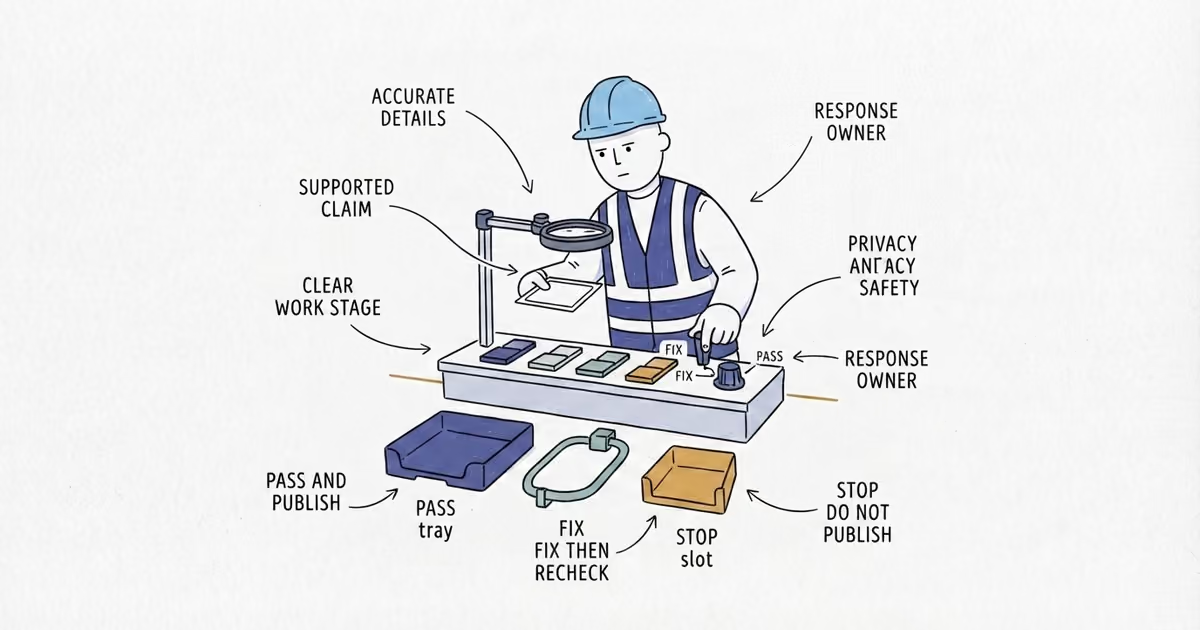
Contractors avoid looking unprofessional on social media by using accurate business details, honest claims, clear words and pictures, customer privacy, safe work, and response ownership. That does not require corporate scripts, expensive cameras, or perfect jobsite clothes.
Use this check before every post. Pass means move on. Fix means correct it and check again. Stop means do not publish. A better caption cannot repair missing customer permission, a materially false claim, or a real safety problem.
Last verified: August 27, 2026 (United States).
Social Media Professionalism Checklist for Contractors
1. Profile
Pass: The profile shows the current business name, services, service area, phone number, website or inquiry route, and honest hours or availability. Any claim about licensing, insurance, certification, warranties, or years in business matches current records and applies to the work and location involved.
Fix: Correct an old phone number, broken link, outdated service area, expired offer, or availability that the crew can no longer support.
Stop: Do not publish under a profile that materially misstates who the business is, what it does, or what credentials it holds. Resolve that claim first.
If the same phone, hours, or service area is wrong across Facebook and other public profiles, ShiftFlow’s local listings cleanup helps correct the core information customers see.
2. Claims
Pass: The caption describes the work actually shown. Dates, materials, job scope, savings, warranties, and results can be checked against the job record.
Fix: Remove unsupported superlatives such as “best in town,” a guarantee the business cannot honor, or vague wording that makes a repair sound like a full replacement. Label an offer with its real terms and current end date.
Stop: Do not publish a claim that is false or would leave a reasonable customer with the wrong idea about the work or result. The Federal Trade Commission’s advertising guidance says claims must be truthful, not misleading, and appropriately supported. That applies to a social post as well as a formal ad.
3. Copy
Pass: The spelling, trade terms, customer name, and place name are correct. The caption says what the viewer is looking at in plain language. It labels the work as before, in progress, a temporary repair, or complete.
Fix: Delete internal notes, unexplained abbreviations, pasted instructions, and repeated punctuation. Correct the details, then read the caption aloud to catch missing words.
Stop: Hold the post if the team cannot confirm the customer, location, job stage, or technical statement.
4. Visual and Work Stage
Pass: A viewer can identify the subject. The image is upright, the crop keeps the important work visible, and the light is good enough to see the result. If sound carries part of the meaning, the words are understandable. A clear phone photo or clip is enough.
Fix: Choose the clearer frame, straighten the image, trim dead space, or replace audio that cannot be understood. Label exposed equipment, debris, open walls, or temporary work accurately rather than presenting it as a finished job.
Stop: Do not use stock-like polish or elaborate edits to hide what the crew actually delivered. Do not show unfinished work as the final result.
5. Customer Privacy
Pass: The customer has given the permission your business requires, and the frame has been checked for faces, children, addresses, house numbers, license plates, keys, lock or alarm details, documents, computer screens, invoices, and private conversations.
Fix: Use a different frame or crop out information that the customer did not agree to share. The FTC’s guide to protecting personal information tells businesses to know what personal information they hold and protect it. Apply that same discipline before jobsite material leaves the phone.
Stop: Do not publish when permission is missing or sensitive information cannot be removed safely. “We can delete it later” is not a privacy check.
6. Safety and Scope
Pass: The post shows work the team can stand behind, without asking anyone to stage a risky act for the camera. Any context needed to understand the scene is accurate and visible.
Fix: Remove footage that could be mistaken for broad do-it-yourself safety guidance. Keep the caption tied to this job instead of turning one clip into instructions for every property or system.
Stop: If the material shows a genuine hazard or unsafe practice, send it to the person who owns jobsite safety and correct the problem. Do not try to explain the hazard away in the caption. OSHA’s recommended practices put management leadership, hazard identification, and correction inside the safety program; the social post comes after that work.
If the post uses live jobsite footage, the jobsite video guide helps make separate record and publish decisions around hazards, permission, people, audio, and property details.
7. Public Disputes
Pass: One person has the facts and is calm enough to reply. The public response can acknowledge the concern briefly without exposing job details, and customer-specific discussion can move to a private channel.
Fix: Pause, preserve the post and job records, and assign the response before typing. Remove insults, guesses, private details, and anything written mainly to win the argument.
Stop: Do not argue in public, reveal customer information, or ask employees, friends, or customers to pile on. A fast angry reply creates a second problem without resolving the first one.
8. Response Owner
Pass: Write down the name of the person checking comments and messages after publication: Response owner: ________. Test the phone, form, or link in the post. Name a backup for days off and jobsite stretches.
Fix: Correct a broken contact route or unclear handoff before publishing. If a material error is found later, the response owner coordinates the correction or removal rather than leaving different crew members to improvise.
Stop: Do not publish a post that invites inquiries when nobody can receive, review, and route them within the response standard the business promises. Every scheduled post needs review and response time; the separate cadence decision starts with that capacity.
When review and reply coverage is the constraint, the social media posting schedule helps calculate a sustainable weekly slot count from assets, production time, and approval capacity.
A Contractor Social Media Post Review Example
Clearview Painting has an ordinary phone photo of a completed exterior repaint. The house is easy to see, the image is upright, and the color looks accurate. It does not need a filter or a professional camera.
The first review finds four fixable problems. The profile still lists Saturday availability that the crew no longer offers. The caption says “whole-house transformation,” but the job record covers the front elevation only. The neighborhood name is misspelled. A mailbox number and a child in the neighboring yard appear at the edge of the frame.
The owner updates the availability, changes the claim to “front elevation repaint,” corrects the place name, and chooses a tighter frame that removes the private details. The customer permission is on file, the work is complete, no safety concern appears, and Mia in the office is named as response owner with the owner as backup. The phone link works.
Final decision: Publish. The post passes because it is accurate, clear, privacy-checked, and covered after publication. Better production would not make it more professional.
This checklist is a practical operating standard, not state-specific licensing, privacy, insurance, employment, or workplace-safety advice. Verify the rules that apply to your business, location, crew, and job.
Frequently Asked Questions About Contractor Social Media Professionalism
Can crew members post photos from a customer’s jobsite?
Only through the business’s approved process. The crew member still needs customer permission, the privacy and safety checks, accurate job details, and a named response owner; a personal account does not remove those responsibilities.
What should contractors do when a published social media post has a mistake?
Correct a minor spelling or factual error and check the full post again. Remove the post when it contains a materially false claim, missing permission, sensitive customer information, or a real safety problem, and preserve the relevant records if a dispute is involved.
Sources
- local-platform-decisions
- how-to-avoid-looking-unprofessional-on-social-media
- contractor-social-media-professionalism
- social-media-professionalism-checklist
- contractor-social-media-mistakes
- pre-publish-social-media-checklist