Should I Add a Booking Link to My Google Business Profile?
Decide whether customers should book, request an estimate, or call, then add and test a Google Business Profile link that matches what the business can fulfill.
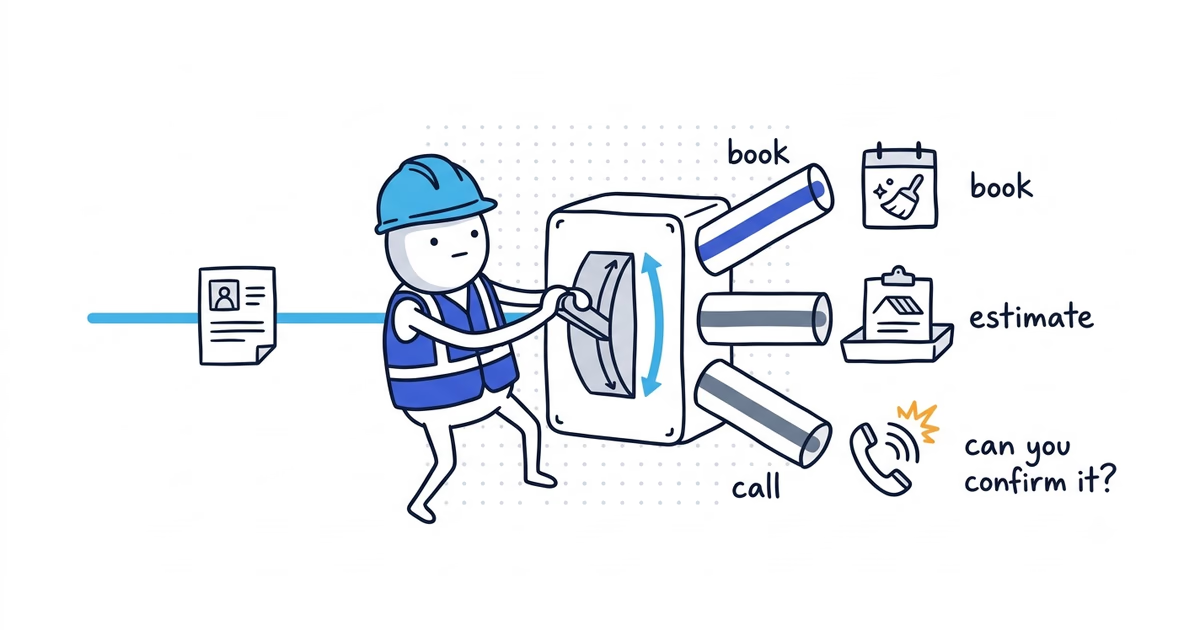
Add a booking or appointment link only when the destination matches what your business can actually confirm.
For a recurring cleaning visit, that may be a real appointment. For a roof leak, repipe, panel upgrade, or system replacement, the right next step is usually an estimate request or a phone call. Calling every form a booking creates the wrong expectation before your team has spoken to the customer.
Book, Request an estimate, and Call are customer-path decisions. They are not three buttons Google guarantees every profile will receive. The actual controls and labels depend on the business category, region, account, and available providers.
Google documentation checked: July 21, 2026 (United States).
Should customers book, request an estimate, or call?
Work through this decision before adding a link:
- Can the customer identify the correct service without diagnosis?
- No: use Request an estimate or Call.
- Yes: continue.
- Can you explain the price or pricing basis before arrival?
- No: use Request an estimate.
- Yes: continue.
- Can you predict the job duration well enough to reserve a real slot?
- No: use Request an estimate or Call.
- Yes: continue.
- Can the system check the service area, lead time, and live capacity?
- No: collect a request without confirming the appointment.
- Yes: continue.
- Is the job urgent or likely to involve active damage, loss of heat, power, water, or security?
- Yes: make Call the primary path.
- No: a confirmed Book now path may fit.
The three outcomes mean different things:
| Workflow outcome | What the customer should expect | Best fit |
|---|---|---|
| Confirmed booking | A real appointment is created for a defined service and available time | Predictable, standardized work with controlled duration and coverage |
| Estimate request | The business receives details, checks fit, and follows up before confirming | Variable scope, diagnosis, site conditions, or custom pricing |
| Call | The customer speaks with the business or its real intake team now | Urgent, unsafe, highly variable, or hard-to-describe work |
A request form is still useful. It simply should not tell the customer that a crew is booked when the business has only received a lead.
Which home-service jobs should customers book online?
Can customers book recurring house cleaning online?
The customer chooses home size, cleaning type, address, frequency, and an available slot. The system checks the service area and crew capacity, shows the price or pricing basis, and creates a confirmed visit.
This can support a confirmed booking when the company has clear exclusions and a process for unusual conditions.
Can customers book HVAC maintenance online?
A defined seasonal tune-up may have a known duration and service area. It can be bookable when the calendar reflects real technician capacity.
“My system stopped cooling” is different. The cause and repair time are unknown. That request should enter a diagnostic or call path rather than reserve a generic repair slot that may be too short.
Should roof leak customers request an inspection first?
Weather, roof access, active interior damage, material, height, and safety conditions change the next step. Send the customer to an inspection or estimate request that collects the address, leak location, timing, and photos. Do not confirm a repair appointment before the business reviews the situation.
Should electrical panel upgrades start with an estimate?
The company needs the property type, existing service, requested capacity, equipment, access, and possibly utility details. Use Request an estimate or a consultation request.
If the customer reports sparking, smoke, a hot panel, or another immediate hazard, use Call and provide appropriate emergency instructions through the actual intake process. A calendar is not the right first tool.
If the business accepts urgent calls, the emergency service setup guide helps align Call, profile hours, intake, and real dispatch capacity before this path is published.
Should repipes and system replacements start with an assessment?
These jobs require scope, equipment, access, property, and scheduling decisions. The form can collect the basics and arrange an assessment. It should not create a confirmed installation date.
Manual appointment links vs. provider-managed booking
Google supports more than one path, depending on what is available for the profile.
| Setup path | What it does | Use it when |
|---|---|---|
| Manual business link | Sends the customer to a booking, estimate, or other action page | The business already has a dedicated page or scheduling system |
| Provider-managed booking | Connects an eligible scheduling provider to Google’s booking flow | The option is available and the provider can create appointments the team honors |
A provider connection is not automatically better. The correct choice is the one that keeps services, service areas, availability, confirmations, and team notifications accurate.
If a former provider still controls a link or an old calendar appears, remove or disconnect it through the profile or provider before adding another path. Do not leave two systems accepting appointments against different capacity.
Google Business Profile booking link requirements
Google’s business-link policies require a dedicated destination that lets the customer complete the named action. The page must also be accessible to Google’s crawler.
For a home-service business, the destination should:
- Open directly to the booking or estimate task, not a generic homepage
- Work without forcing the customer to search for the service again
- Explain whether the result is confirmed or only requested
- Check or collect the service address
- Show the relevant service choices
- Collect enough information to route the request
- Display accurate availability or avoid pretending a slot is confirmed
- Produce a clear on-screen result and a notification the team actually receives
Do not use a social profile, messaging-only page, app-store download, or shortened link as a substitute for the action page. Avoid redirect chains that send mobile customers somewhere unexpected.
How to add a booking or appointment link
The exact control can differ by profile. It may appear under Booking, Appointments, or another business-links section. The label shown publicly may not match the workflow terms used in the decision tree above.
Add a manual link
- Sign in to the Google account that manages the Business Profile.
- Find the profile in Google Search or Maps.
- Open the available Booking, Appointments, or business-links control.
- Add the full URL of the dedicated action page.
- Choose a preferred link if the live profile offers that option and more than one eligible link exists.
- Save the edit.
When the site’s analytics setup supports UTM parameters, use a consistent manual-link URL such as:
https://example.com/request-estimate?utm_source=google&utm_medium=organic&utm_campaign=gbpThe tracking code helps separate visits from this link. It does not replace call tracking, lead-source review, or confirmation that an inquiry became a job.
Connect a booking provider
If Google shows provider-managed bookings, select an available provider and follow the connection steps shown by Google and that provider. Confirm which services, locations, team members, and calendars will sync before turning the path on.
Do not assume the option will appear for every business. Eligibility and supported providers can vary.
How to test a Google Business Profile booking link
Do not stop when the link saves successfully. Test it as a customer.
- Find the public profile while signed out. Check Google Search and Maps.
- Read the button. Does its wording match what happens after the click?
- Open it on a phone. Confirm the destination loads without login, app installation, or a broken redirect.
- Choose a real service. Check that the service exists on the business’s current offer and profile.
- Enter an edge-of-area address. Confirm the system accepts, rejects, or flags it correctly.
- Choose a time if offered. Make sure it reflects live capacity and the correct time zone.
- Complete a test request. Check whether the result says confirmed, requested, or pending review.
- Check team notifications. The right person should receive enough detail to act.
- Check source tracking. Confirm the UTM visit or provider source appears where expected.
- Cancel the test cleanly. Make sure the customer has a working change or cancellation path when relevant.
A button that opens is not necessarily a working booking path. The task is complete only when the customer and the team receive the same result.
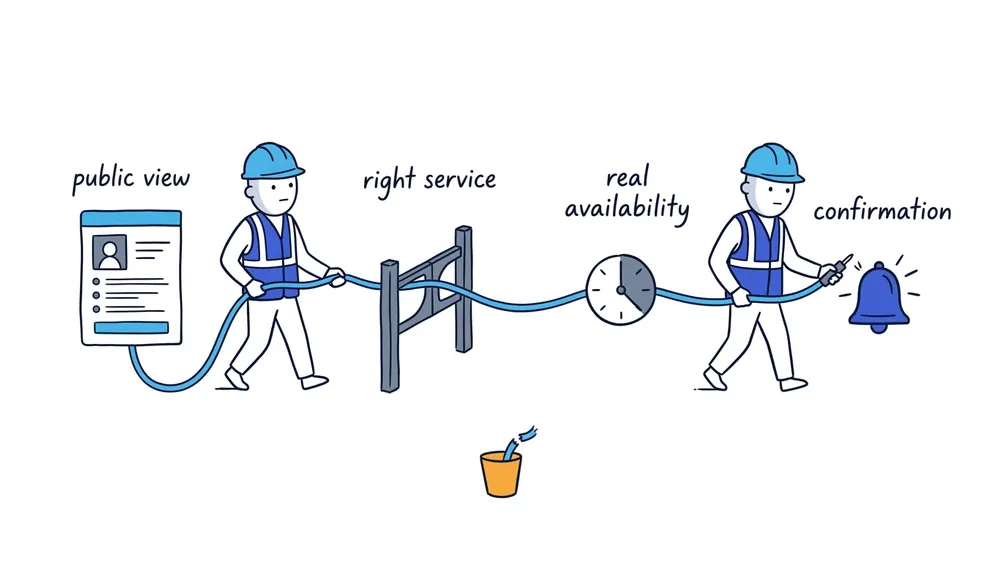
Fix a booking link that does not work
| Problem | What to check |
|---|---|
| No booking field appears | The category, region, or account may not be eligible for that control |
| Google rejects the link | Confirm it is a direct, crawlable action page rather than a prohibited destination |
| The link opens the wrong page | Remove redirect chains and replace the saved URL with the final destination |
| The scheduling page expired | Publish a stable destination and update the profile link |
| Two booking choices conflict | Remove an old provider or set the correct eligible preferred link |
| Customers receive false confirmations | Change the flow to an estimate request until capacity and scope can be confirmed |
| The team never sees the request | Repair notifications and run another signed-out test before restoring the link |
Keep the link only while the business can fulfill its promise. If the operation changes, change the action from booking to estimate, replace the destination, or remove the link until the workflow is reliable.
Frequently asked questions
Can every business add a booking link to Google Business Profile?
No. Business-link controls, native booking, and supported providers can vary by category, region, and account. Use only the options shown on the live profile.
How do I remove an old booking link from Google Business Profile?
Remove a manual link through the profile’s Booking, Appointments, or business-links control. If a provider manages the link, disconnect it through Google or the provider, then test the public profile while signed out.
Does a Google Business Profile booking link improve rankings?
Google does not guarantee a ranking increase from adding a booking link. Add one when it gives customers a direct action the business can fulfill, not as a ranking tactic.
Sources
- google-business-profile
- booking-link
- appointment-link
- online-booking
- home-services