Restaurant Time Clock Offline: What to Do
A time clock outage during peak service creates open shifts, phantom hours, and payroll chaos. Learn how to evaluate offline mode limitations, build a damage control plan, and prevent outages from wrecking your labor records.
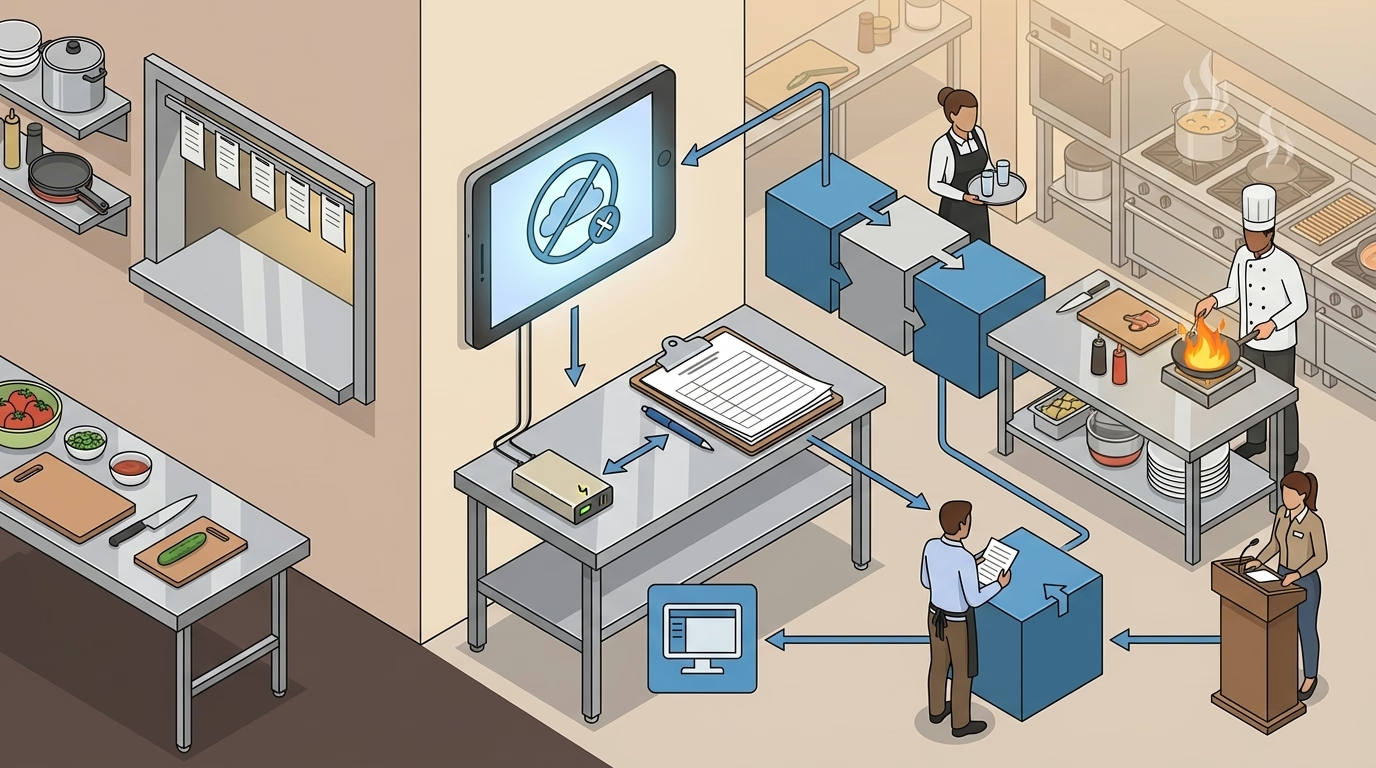
It is 5:47 p.m. on a Friday. The dinner rush is building. A server walks up to the time clock to punch in for her shift. The screen is frozen. The tablet shows a spinning wheel. The WiFi icon has a slash through it.
Within minutes, three more team members are standing at the station with no way to clock in. The kitchen is already firing orders. The host is seating tables. And your labor records for the busiest shift of the week are about to become a reconstruction project.
Time clock outages in restaurants are not rare. Internet drops, power surges, software crashes, and hardware failures all happen—and they disproportionately affect restaurants because restaurant operations cannot pause while IT troubleshoots. Every minute the time clock is down during service is a minute of unrecorded labor that must be manually reconciled later.
This guide covers what actually happens during a time clock outage, how to evaluate your system’s offline capabilities, and how to build a response plan that prevents an outage from becoming a payroll disaster.
Why Offline Failures Hit Restaurants Hardest
When a time clock goes down at an office, workers can send an email noting their arrival time. When it goes down at a restaurant during dinner service, nobody has time to document anything—they are too busy serving guests.
Peak-Hour Dependency
Restaurants concentrate the majority of their labor hours into a few peak windows. A lunch service from 11 a.m. to 2 p.m. and a dinner service from 5 p.m. to 10 p.m. account for 70–80% of a typical restaurant’s weekly labor hours. A time clock outage during these windows affects the maximum number of team members at the exact time when those team members are least able to deal with the disruption.
An outage that starts at 5:30 p.m. and lasts until 6:15 p.m. may affect 15–20 team members who are trying to clock in for the dinner shift. A 45-minute outage during a slow Tuesday afternoon might affect two or three people. The impact is entirely dependent on timing.
No Desk, No Email, No Fallback
Office workers can log their hours in a spreadsheet, send an email, or message their manager through Slack. Restaurant team members are on their feet, wearing aprons, and juggling plates. They do not have computers at their stations. Their phones may be in a locker. The only time tracking device available is the one that just went down.
This is why restaurants need a physical, pre-positioned backup—not a digital alternative that requires the team member to take initiative during a rush.
Hourly Workforce Means Every Minute Counts
Salaried workers are paid the same regardless of what the time clock says. For a restaurant’s hourly workforce, every unrecorded minute is a potential wage dispute. A team member who claims they arrived at 5:00 p.m. but was not recorded until 6:15 p.m. (when the system came back up) is owed 75 minutes of pay. If you cannot verify the actual arrival time, the FLSA puts the burden of proof on the employer.
Across a large enough staff, those unverifiable minutes become a significant financial exposure. If the outage happened to coincide with a period that pushes team members into overtime, the cost multiplies by 1.5×.
What Actually Happens When Your Time Clock Goes Offline
Understanding the failure cascade helps you build an effective response plan.
Open Shifts With No Clock-Out
Team members who were already clocked in when the outage began have open shifts. The system recorded their clock-in but has no clock-out. Depending on how the system handles open shifts, it may show these team members as still on the clock indefinitely, auto-close the shift at a default time (midnight, for example), or flag the shift as an error requiring manual resolution.
None of these outcomes are ideal. A shift auto-closed at midnight means the team member appears to have worked 18 hours. A flagged error means a manager must manually enter the clock-out for every affected team member—often days later, from memory.
No Clock-In for Arriving Team Members
Team members arriving during the outage have no recorded clock-in. If they start working without documentation, the restaurant has performed work with no time record. If they wait until the system recovers, the restaurant is short-staffed during a rush.
Most restaurants (correctly) tell team members to start working and handle the paperwork later. The problem is that “later” often means “after the payroll cutoff,” and the manual entries are vulnerable to the same accuracy and manipulation concerns as any other post-hoc timecard edit.
Phantom Hours and Ghost Shifts
When the time clock comes back online, the sync process can produce phantom records: duplicate clock-ins from team members who tried to punch multiple times during the outage, shifts with incorrect start times based on when the system recovered rather than when the team member arrived, and offline-cached punches that conflict with manually entered corrections.
Cleaning up these phantom records is time-consuming and error-prone. Without a clear source of truth, the manager is reconciling three data sources: the system’s cached data, the paper backup (if one was used), and team member recollections.
Evaluating Offline Mode: What Most Vendors Don’t Tell You
Many time clock vendors advertise “offline mode” as a feature. The actual capabilities vary enormously, and the limitations are often not apparent until you experience an outage in production.
Questions to Ask Your Vendor
How many punches can be stored offline? Some systems cache a few hundred; others have virtually unlimited local storage. A restaurant with 30 team members clocking in and out over a four-hour outage generates 60+ punches that need to be cached.
Does offline mode support all features? GPS verification, photo capture, role selection, and break tracking may all be disabled during offline mode. If your compliance process depends on any of these features, offline mode may create gaps in your records.
How are conflicts resolved when the system comes back online? If a team member clocked in offline and a manager also entered a manual clock-in for the same team member, what happens? Does the system create a duplicate? Does it prefer one source over the other? Is the conflict flagged for review?
What happens to team members who are not cached locally? Some offline-mode systems only recognize team members whose profiles were downloaded to the device before the outage. A new hire whose profile had not yet synced to the local device may be unable to clock in at all during offline mode.
How long has the offline mode been tested? Ask for specifics. A feature that was tested with a 10-minute outage in a controlled environment may behave differently during a three-hour outage affecting 40 concurrent users.
The Tablet vs. Hardware Trade-Off
Tablet-based time clocks (iPads, Android tablets) are popular in restaurants because they are affordable and support touch-based interfaces. However, tablets are more vulnerable to offline failures because they depend entirely on WiFi connectivity, battery failures can compound a connectivity outage, and consumer-grade hardware is less reliable than purpose-built time clock terminals.
Hardware-based time clocks with local storage and optional cellular backup are more expensive but significantly more resilient. For high-volume restaurants where an outage during dinner service affects 20+ team members, the hardware investment pays for itself in reduced reconciliation costs.

Damage Control: Your Offline Response Plan
Every restaurant should have a documented response plan that activates the moment the time clock goes offline. The plan should be posted near the time clock station and included in manager training.
Immediate Response (First 5 Minutes)
- Acknowledge the outage. Announce to the team that the time clock is down and the backup procedure is in effect. Do not let team members stand at the station hoping it recovers.
- Deploy the paper backup. Retrieve the pre-printed sign-in sheet from its designated location (next to the time clock or in the manager’s station). The sheet should have columns for team member name, role, time in, time out, and manager initials.
- Record currently clocked-in team members. The shift manager should note the names of all team members who are currently working and their approximate clock-in times from the beginning of the shift.
- Continue operations. Do not delay seating, service, or kitchen operations for the time clock.
During the Outage
- Every team member who arrives or departs signs the paper sheet with the actual time, verified by the shift manager.
- The shift manager records break start and end times for compliance tracking.
- If the outage persists for more than one hour, the manager contacts IT or the vendor to understand the expected resolution timeline.
Recovery (When the System Comes Back Online)
- Do not let team members re-punch. Re-punching after recovery creates duplicate records. Use the paper backup as the source for manual entries.
- Enter backup records into the system. The shift manager or designated administrator enters all paper-recorded times into the time clock as manual entries, noting “offline outage backup” as the reason for each edit.
- Reconcile open shifts. For team members who were clocked in before the outage, verify their clock-out time against the paper record and close the shift with the correct time.
- Check for phantom records. Review the system for duplicate punches, incorrect timestamps, or conflicts between cached offline data and manual entries.
- Verify before payroll. Flag all outage-affected shifts for review during the pre-payroll reconciliation process. Do not assume the recovered data is clean.
Post-Outage Review
After the immediate cleanup, conduct a brief review:
- What caused the outage? (Internet failure, hardware crash, software bug, power issue)
- How long was the system down?
- How many team members were affected?
- Did the backup procedure work as expected?
- What could be improved?
If outages occur more than once per quarter, evaluate whether your infrastructure (WiFi reliability, hardware quality, vendor uptime) is adequate for a high-volume restaurant environment. A reliable time tracking system should not be a recurring operational risk.
Offline Preparedness Checklist
- Test offline mode. Disconnect your time clock from the network and attempt to clock in, clock out, and record a break. Verify that punches are cached and sync correctly when connectivity returns.
- Print backup sign-in sheets. Keep a supply of pre-printed sheets at the time clock station. Include columns for name, role, time in, time out, break times, and manager initials.
- Document the response plan. Write a one-page procedure covering immediate response, ongoing outage management, and recovery steps. Post it near the time clock.
- Train all managers. Every shift manager should know the backup procedure without consulting the document. Run a tabletop drill at least once per quarter.
- Verify WiFi reliability. Ensure the time clock is on a dedicated or priority network segment. Consumer-grade WiFi shared with guest access and POS terminals is a common failure point.
- Consider hardware backup. For high-volume locations, evaluate a cellular-enabled hardware time clock that operates independently of WiFi.
- Set up outage alerts. Configure your time clock vendor’s monitoring to send alerts when the device goes offline. The sooner you know, the sooner you can activate the backup.
- Pre-position a charging solution. If your time clock is a tablet, keep a charged backup battery or power bank at the station. A dead battery during a power flicker can extend a 30-second outage into a two-hour one.
- Tag outage-affected shifts. In your time tracking system, create a tag or note category for “offline outage” so these shifts can be easily identified during payroll reconciliation.
- Review vendor SLA. Understand your time clock vendor’s uptime commitment and support response time. If the SLA does not meet the demands of a high-volume restaurant, evaluate alternatives.
The Bottom Line
A time clock outage during a quiet Tuesday afternoon is an annoyance. A time clock outage at 5:30 p.m. on a Friday—with 20 team members trying to clock in for the dinner rush—is a payroll crisis that can take days to resolve.
The difference between an annoyance and a crisis is preparation. A restaurant with a tested backup procedure, pre-printed sign-in sheets, trained managers, and a reliable recovery process can absorb an outage with minimal disruption. A restaurant without those safeguards is reconstructing an entire shift’s labor records from memory.
Test your offline mode. Print the backup sheets. Train your managers. And treat time clock reliability as seriously as you treat your POS uptime—because when the time clock goes down during service, you are accumulating unrecorded labor liability with every minute it stays offline.
- restaurant-time-tracking
- time-clock-offline
- time-clock-outage
- offline-mode
- restaurant-technology
- payroll-accuracy
- business-continuity