Are Before-and-After Photos Good for Contractor Social Media?
Learn when before-and-after photos work for contractor social media, how to match viewpoints, protect customer privacy, and use an honest field checklist.
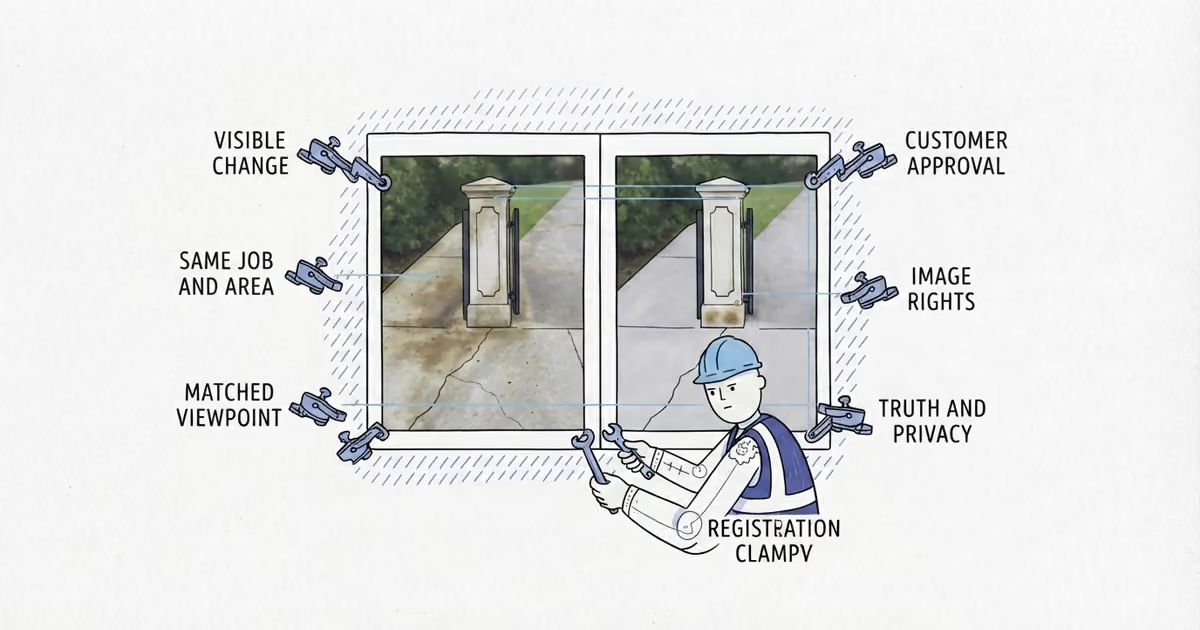
Before-and-after photos are good for contractor social media when a customer can fairly compare the same area before and after your work. Do not publish when the change, permission, image rights, privacy, authenticity, or comparability is uncertain.
Run every pair through six gates:
- Relevant change: The work created a visible result customers can inspect.
- Same job and area: Both images show the same area from one job.
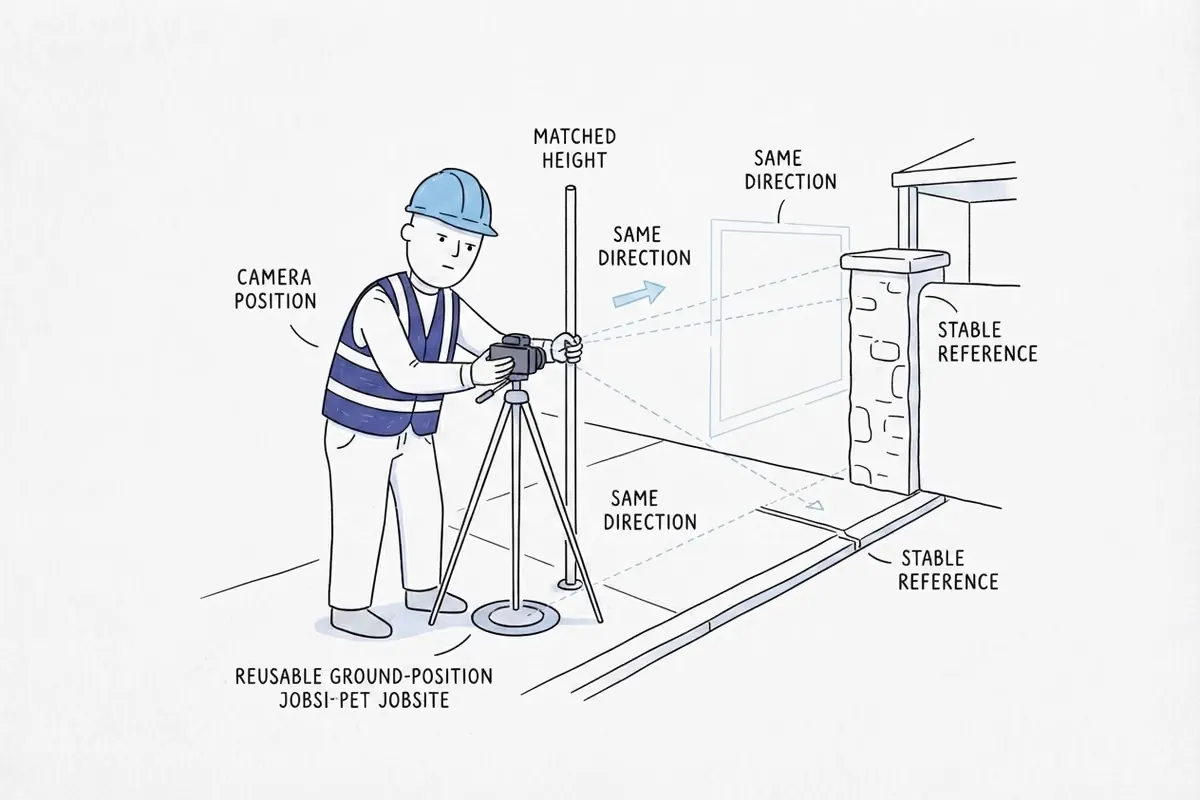
- Matched viewpoint: Position, height, direction, scale, orientation, and reference points are reasonably consistent.
- Customer approval: The customer or property owner approved public use.
- Image rights: The business confirmed its right to use both files.
- Truth and privacy: The pair is accurate, private details are out, and edits do not manufacture the result.
Last verified: August 27, 2026 (US).
When before-and-after photos work for contractors
The format fits visible cleaning, painting, landscaping, restoration, refinishing, installation, repair, and exterior improvement. Not every job needs it.
Hidden plumbing, electrical, HVAC, structural, diagnostic, and maintenance work may need a labeled component photo, process image, or factual explanation instead.
Never mix properties, generate a missing photo, stage damage, or call unrelated views a pair.
How to take matching before-and-after photos
Before work, note a stable position, camera height, direction, distance or zoom, and orientation. Keep a gatepost, paving joint, window edge, or cabinet corner in frame. Capture wide and detail views.
After work and normal cleanup, return to that position. If changed light, weather, season, furniture, or vegetation dominates the result, use the images separately or retake them.
The before image should explain the job, not mock the customer’s housekeeping, finances, safety problem, failed repair, or private life.
How to handle permission and privacy for job photos
Record who approved, the job and images, approval date, intended public or social uses, and restrictions. This conservative practice is not a universal release form; privacy, publicity, property, and contract rules can differ.
Customer approval for what an image depicts does not settle who owns the file. The U.S. Copyright Office says the photographer is generally the initial copyright owner, with limited work-made-for-hire exceptions. Confirm reuse rights for images supplied or taken by a customer, subcontractor, freelancer, former worker, manufacturer, or another business. Do not treat possession or a texted copy as confirmation.
Check both images and the caption for faces, children, names, full addresses, house numbers, license plates, mail, documents, screens, family photos, medicine, keys, access codes, alarm or security details, and distinctive valuables. Avoid or crop the detail before relying on blur. Following the FTC’s business guidance, know what identifying information you keep, retain only what you need, restrict originals, and dispose of unnecessary copies.
How to edit before-and-after photos honestly
The FTC says an advertisement’s overall impression includes words, pictures, and implied claims. A dramatic image or results may vary disclaimer does not repair a misleading comparison.
Ordinary crop, rotation, exposure, and white-balance correction can clarify the real scene. Do not erase defects, add work, replace surroundings, manufacture contrast with filters, or generate proof.
Use this caption pattern:
Starting condition -> service actually performed -> visible result -> relevant limitationWhen someone else changed the space, name only your contribution. The pair proves one job, not an identical future result.
Where supported, describe the condition, work, and result in alternative text rather than writing only before and after. W3C guidance says informative-image text should convey meaning or content. Keep essential context in the visible caption too.
Before-and-after photo checklist for contractors
| Stage | Complete these checks |
|---|---|
| Before work | Identify a visible condition worth proving. Confirm the photo plan and intended use. Choose a privacy-safe angle. Mark the camera position, height, direction, scale, orientation, and stable reference points. Capture wide and detail views. |
| After work | Finish the work and normal cleanup. Return to the matched position. Capture the real result and any remaining limitation. Note material changes in light, weather, furniture, season, or surroundings. |
| Before publishing | Run all six gates. Confirm the approval record and image rights. Remove private details. Reject misleading edits. Add the factual caption and useful alternative text where supported. Preview the pair on a phone. |
The checklist has four possible outcomes:
- Publish the pair when all six gates pass.
- Use separate or process photos when the work is real but the comparison is weak.
- Retake if possible when the finished result exists but the view is unfair or unreadable.
- Do not publish when authenticity, approval, rights, privacy, or truthfulness remains uncertain.
Before-and-after photo examples for contractors
Publish: An exterior cleaner photographs a stained path using a gatepost and paving joint as references, then returns to the same spot. The customer approved the images, the house number is outside the crop, and exposure correction preserves older discoloration. The caption states the condition, service, improvement, and limitation.
Do not publish: A painter’s shaded before photo is tight; the after is wide, sunlit, and includes new landscaping. Angle, light, and unrelated work create the apparent transformation. A disclaimer cannot make it fair.
Use another format: An electrician corrects a hidden panel connection, but the closed panel looks unchanged. A labeled component image and factual note are better evidence than a forced pair.
When the same pair is headed to a Google profile, the Google Business Profile photo guide helps apply Google’s current photo rules and account for gallery behavior. When the pair will support a customer’s estimate, the quote photo guide helps choose relevant proof and place it without crowding the scope or price. Still-photo pairs also require different decisions from jobsite video, general Facebook or Instagram content, and follower-to-customer tracking.
A credible pair is evidence from one completed job, not a guarantee of reach, engagement, inquiries, rankings, revenue, or social-media return.
Frequently asked questions
Can Contractors Post an After Photo Without a Before Photo?
Yes, as a standalone completed-job photo when it accurately shows your work and passes the approval, image-rights, and privacy checks. Do not pair it with an unrelated before image or generate one.
Can Contractors Use Before-and-After Photos If Another Trade Did Part of the Work?
Only when the caption identifies your contribution and the pair does not imply you completed someone else’s work. If the other trade’s work creates most of the visible change, use different proof.
Sources
- Advertising FAQs: A Guide for Small Business, Federal Trade Commission.
- Protecting Personal Information: A Guide for Business, Federal Trade Commission.
- What Photographers Should Know About Copyright, U.S. Copyright Office.
- W3C WAI Images Tutorial: Informative Images, World Wide Web Consortium.
- local-platform-decisions
- are-before-and-after-photos-good-for-contractor-social-media
- before-and-after-photos-for-contractors
- contractor-social-media-photos
- how-to-take-matching-before-and-after-photos
- permission-to-use-job-photos
- before-and-after-photo-checklist