How Do Service Areas Affect Google Maps Ranking?
Separate the customer-facing Google Business Profile service area from the location-dependent ranking footprint, then make compliant decisions about nearby cities and the real operating base.
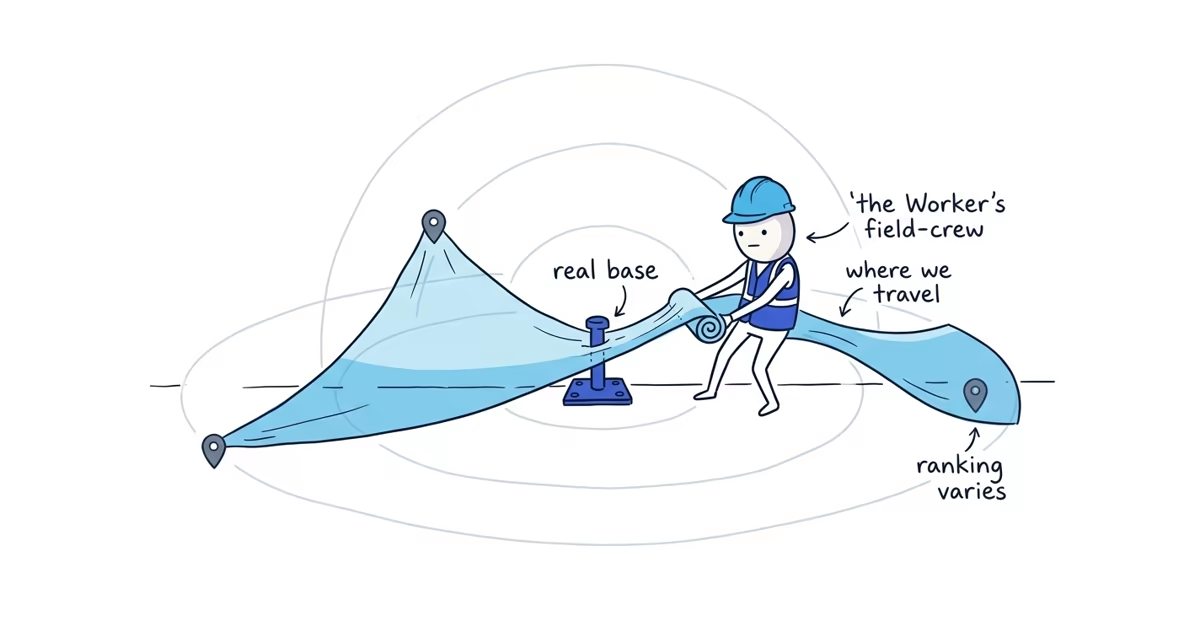
Adding a city or ZIP code to the service-area field tells customers where the business works. It does not guarantee a higher Google Maps ranking in that place.
Google confirms that distance is one of the main factors in local results. It also says the service-area field helps customers find and understand where a business provides products or services. Google does not say that every selected area becomes a ranking location or that a longer list expands ranking reach.
A point-in-time field test published by Sterling Sky observed no ranking change when the configured service area changed. That is useful field evidence, not a permanent disclosure of Google’s algorithm. The safe conclusion is narrower: use service areas to describe honest customer coverage, not as a way to manufacture locations.
Google Business Profile service areas vs. ranking footprint
Consider Cedar Grove Plumbing, a home-based plumber that travels to customers. Its real operating base is in Cedar Grove, and it also accepts work in Westfield and Brookhaven.
LAYER 1: CUSTOMER-FACING COVERAGE

Profile service areas:
[Cedar Grove]  [Westfield]  [Brookhaven]

Meaning: "We normally travel to customers in these places."
This layer should be specific and accurate for customers.

------------------------------------------------------------

LAYER 2: LOCATION-DEPENDENT RANKING FOOTPRINT

Search near the real base          Search farther from the real base
        [Customer A] ---- [Cedar Grove base] -------- [Customer B]

Results can change with:
- how well the business matches the search
- distance from the location used for the search
- how well known and credible the business appears

WARNING: Selecting Westfield or Brookhaven above does not move the
business base or guarantee a map-pack position there.
The first layer is a statement to customers. The second is the area in which the business actually appears for local searches, and it can change from neighborhood to neighborhood. The two shapes may overlap, but they are not the same thing.
Service-area business vs. hybrid business
Google distinguishes between two relevant business types:
- A service-area business travels or delivers to customers and does not serve customers at its business address.
- A hybrid business serves customers at its staffed business address and also travels or delivers to them.
A home-based plumber who never receives customers at home can provide the real operating address to Google and hide it from the public profile. Hiding the address does not mean the business has no real base. It means customers should not be sent to a private location where they cannot receive service.
Do not show a residential address merely to obtain a map pin. The public address setting should reflect how the business actually serves customers, not how the owner hopes Google will rank it.
If the business type or address visibility is still unclear, the service-area setup guide helps you choose the correct profile type and configure the real address and service areas without misdirecting customers. For ranking, the important point is that the underlying operating location remains real even when customers cannot see it.
What to add to your Google Business Profile service area
Google currently asks businesses to choose named cities, postal codes, or other areas. The field no longer works as an owner-defined radius.
Its main limits are:
- Up to 20 service areas
- Specific named areas rather than an editable distance circle
- An overall area that generally should not extend beyond about two hours’ drive from the business base
These are configuration limits, not goals. Entering all 20 areas does not make the profile stronger. Drawing the widest allowed boundary does not make every searcher inside it local to the business.
Choose places where the team normally accepts and completes work. A customer who sees an area on the profile should be able to request a job there without learning that the drive is too far, the trip fee is unexpected, or the business does not actually cover the location.
Use the list to answer a customer question: “Will this business come to me?” Do not use it to make a claim about where the business deserves to rank.
How a plumber can approach ranking in a nearby city
Cedar Grove Plumbing wants more work in Brookhaven. The city is within the company’s practical travel range, so adding Brookhaven as a service area is accurate. It tells a Brookhaven customer that the plumber will travel there.
The edit does not:
- Move Cedar Grove Plumbing’s operating base into Brookhaven
- Create a staffed Brookhaven location
- Guarantee visibility for
plumber near mefrom every Brookhaven neighborhood - Guarantee a place in Brookhaven’s map pack
The owner should keep the location truthful and make a business decision about the market:
- Confirm operational fit. Check drive time, scheduling, trip cost, emergency coverage, and whether Brookhaven jobs are profitable.
- Represent the work accurately. The website can explain that the company serves Brookhaven and show genuine plumbing work relevant to those customers. It should not pretend the business is based there.
- Earn real customer evidence. Complete good work, ask customers for honest reviews without incentives, and build a real reputation in the market. Do not promise that reviews from one city will overcome distance.
- Check actual visibility. Compare the same service query from a few real customer locations in and around Brookhaven.
- Measure business results. Record qualified leads and booked jobs from the area. A visible rank is evidence of search exposure, not proof that the market is producing worthwhile work.
These actions can improve truthful relevance and credibility. None guarantees that a business based elsewhere will outrank a strong nearby competitor.
Why Google Maps rankings change by search location
The owner’s search location affects the result. A search from the business base, the owner’s home, or a current job site can produce different businesses for the same words.
Run a small manual check:
- Pick one exact query, such as
plumber near meorplumber Brookhaven. - Ask people at two or three real customer locations to run the same query.
- Record the location, date, whether the profile appears, and its approximate position.
- Repeat after a meaningful business change, not every day.
This is enough to expose a clear location pattern. It does not require specialized grid-tracking software.
Keep the interpretation narrow. If the profile appears near Cedar Grove but not across Brookhaven, the business has a location-dependent ranking constraint. That result is not a reason to add more areas, expose a home address, or create false locations.
Can a service-area business create a profile in every city?
No. Google generally allows a service-area business one profile for its central office or location.
A genuinely separate location may qualify for its own profile when it is a real operating location with separate staff and it meets Google’s representation rules. A P.O. box, remote mailbox, borrowed address, virtual office, or unstaffed location does not become eligible because the business wants to rank in that city.
Do not use an employee’s, relative’s, or customer’s address as a location unless it is genuinely an eligible operating location for the business. Do not create overlapping profiles for the same central operation.
False-location tactics create a policy and ownership problem on top of the original distance problem. They also mislead customers about where the business is based.
What to do when service areas do not expand ranking
Playbook’s recommendation follows from the distinction above:
- Keep the service-area list accurate. Select the places where the team normally works, not every location the profile allows.
- Keep the operating location compliant. Hide a home address when customers are not served there, and do not replace it with a mailbox, virtual office, borrowed address, or other false location.
- Work on relevance and prominence within the real distance constraint. If visibility remains weak after the coverage and location are accurate, the Google Maps ranking guide helps you correct business information and category fit, then build customer and web evidence over time.
The service-area field answers where the business is willing to go. It does not decide where Google must rank it.
Frequently asked questions
Does hiding my home address hurt Google Maps ranking?
Google does not publish a ranking advantage for showing a home address. If customers are not served there, provide the real operating address to Google and hide it from the public profile; do not expose a private address solely to obtain a map pin.
Can I rank in a nearby city without an office there?
Yes, a business can appear outside its home city, but adding that city as a service area does not guarantee it. Keep the location truthful, show real service and customer evidence for that market, and measure results from actual customer locations within the distance constraint.
Sources
- google-business-profile
- service-area-business
- service-areas
- nearby-city-ranking
- google-maps-ranking