How Do I Rank Higher on Google Maps?
Rank higher on Google Maps by fixing Profile eligibility and categories, strengthening website relevance, earning reviews and local authority, and measuring visibility by location.
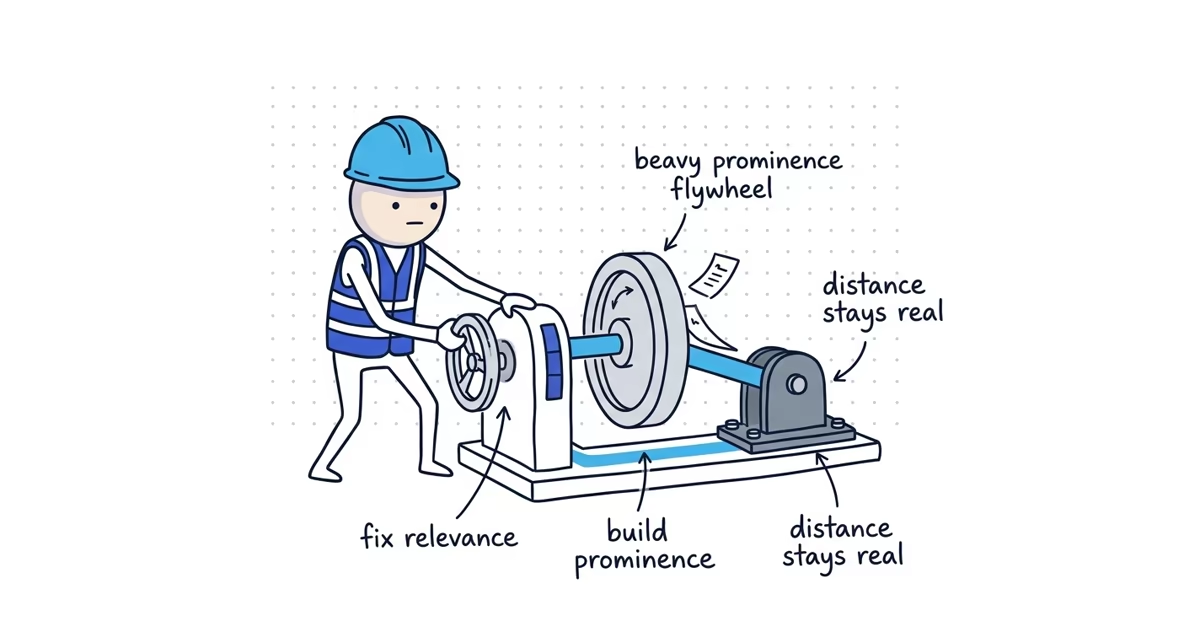
To rank higher on Google Maps, improve the signals Google uses to judge relevance and prominence while working within the real distance between the business and the searcher.
Work through these seven steps in order:
- Make sure the Google Business Profile is eligible, verified, public, and not competing with a duplicate.
- Choose the most accurate primary category and only relevant additional categories.
- Complete the real business information, services, hours, phone number, and website link.
- Strengthen the website page connected to the Profile so it clearly proves the service, location, and business.
- Build a steady process for genuine customer reviews.
- Earn credible local links, mentions, and useful directory listings.
- Track the same commercial searches from several customer locations and fix the largest gap first.
Do not try to rank farther away by adding dozens of service areas, creating false offices, or stuffing keywords into the business name. Those tactics do not remove Google’s distance factor and can create Profile policy problems.
What affects Google Maps ranking?
Google explains local ranking through three factors: relevance, distance, and prominence. It does not publish the exact weight of each factor, and the balance can change by query and searcher location.
| Ranking factor | What it means | Can you improve it? | What to work on |
|---|---|---|---|
| Relevance | How well the business matches the search | Yes | Profile eligibility, categories, services, business information, and website content |
| Distance | How far the business is from the searcher or named place | Not directly | Keep the real location accurate, measure the actual footprint, and set realistic expectations |
| Prominence | How established and credible the business appears | Yes, over time | Reviews, links, local mentions, directories, website authority, and real-world reputation |
The practical goal is not to “optimize all three.” Fix relevance first because it gives Google a clear understanding of the business. Then build prominence so the business has stronger evidence than nearby alternatives. Distance remains a constraint.
Find the reason you are not ranking
Do this before editing the Profile. Different symptoms need different fixes.
| What you see | Likely problem | Check first |
|---|---|---|
| The correct Profile does not appear for the exact business name | Eligibility, verification, suspension, ownership, or duplicate issue | Profile status, verification, public visibility, and duplicate listings |
| The Profile appears by name but not for an important service | Relevance issue | Primary category, additional categories, services, and the linked website page |
| The business ranks near its location but disappears across town | Distance constraint | Results from several real customer locations and the location of visible competitors |
| The business appears around positions 4–10 across much of the area | Prominence or competitive gap | Reviews, website evidence, local links, and the businesses consistently in the top three |
| The Profile ranks but produces few calls or website visits | Conversion problem, not only ranking | Review quality, photos, hours, offer clarity, call handling, and landing page |
| The result changes every time someone checks | Search-location or personalization difference | A fixed list of queries and fixed measurement locations |
If the business is missing even when searched by exact name, use the Google Maps visibility decision tree before doing ranking work. A category change or backlink cannot repair a suspended, unverified, or duplicate Profile.
1. Fix Profile eligibility and duplicate problems
Start with a signed-out search for the exact public business name. Open the result and confirm that it is the correct Profile.
Check these items:
- The Profile is verified and publicly visible.
- No suspension, disabled status, verification request, or unresolved ownership notice appears in the account.
- One eligible Profile represents each real business location. The company is not splitting one operation across duplicate Profiles.
- The public business name matches the name used in the real world. It does not contain added services, cities, or marketing phrases.
- The address model matches how the business operates. A service-area business hides its address when customers are not served there.
- The map pin, phone number, hours, and website belong to this business and location.
Do not create a new Profile just because the existing one ranks poorly. A second Profile can divide reviews, confuse ownership, or become an ineligible duplicate.
This step is complete when: the correct Profile appears for the exact business name, the owner can manage it, and no known status or duplicate problem remains.
2. Choose the right Google Business Profile categories
Categories are one of the clearest ways to tell Google what the business is. The primary category should describe the main business type, not the most profitable job, a service offered occasionally, or a keyword the owner wants to rank for.
Use this process:
- List the business’s main source of completed work during a normal month.
- Open the current category selector and find the most specific accurate category for that business type.
- Use that category as primary when it represents the overall operation better than the current choice.
- Add only a small number of additional categories that describe genuine parts of the business.
- Keep individual jobs and offerings in the Services section rather than turning every service into a category.
- Check the businesses that consistently appear for the target searches. Use them to spot a category you may have missed, not as permission to copy an inaccurate category.
Example: a company that mainly repairs plumbing systems should not use a broad remodeling category simply because it also handles bathroom projects. “Plumber” describes what the business is. Drain cleaning, water heater repair, and leak detection belong in services unless another available category accurately represents a real division of the business.
Record the current categories and baseline visibility before making a justified change. Google may ask for reverification after a category edit, so avoid changing categories every week.
The Google Business Profile category guide includes a category worksheet and trade examples.
This step is complete when: the primary category is the most specific accurate description of the business, every additional category represents real work, and the website supports those choices.
3. Complete the Profile information that supports relevance
An accurate category cannot compensate for an incomplete or misleading Profile. Complete the information customers and Google need to understand the business.
Review each field:
- Business name: Use the real public name. Do not add services or cities that are not part of it.
- Address or service-area setup: Use the genuine operating location. Hide the address when customers are not served there.
- Phone: Use a number that reaches this business and can be answered reliably.
- Hours: Keep regular and special hours current so customers do not arrive or call when the business is closed.
- Website: Link to the strongest page for this business or location, not a tracking redirect or unrelated corporate page.
- Services: Add the core services customers can actually buy. Use clear names and useful descriptions.
- Attributes: Complete only the attributes that truthfully apply.
Descriptions, photos, and Posts can help customers understand and choose the business. Keep them accurate and representative. Do not treat an upload schedule or repeated minor edits as a substitute for correct categories, services, and contact information.
This step is complete when: a customer can understand what the business does, where it operates, when it is available, and how to contact it without finding a contradiction between the Profile and the website.
4. Strengthen the website connected to the Profile
The website helps establish both relevance and prominence. The page linked from the Profile should make the business, service, location, proof, and next action obvious.
Use the right destination:
- A single-location business can link to its homepage when that page clearly explains the main services and real market.
- A multi-location business should normally link each Profile to the page for that specific eligible location.
- Do not link every Profile to a generic page that hides the local business details.
- Do not create thin city pages that repeat the same text with a different place name.
The linked page should answer:
- Who is the business?
- What core services does it provide?
- Which real location or service market does this page represent?
- What proof supports the claims, such as licenses, project examples, team experience, customer evidence, or relevant certifications?
- How can a customer call, request an estimate, or book the next step?
Build separate service pages when an important service needs a useful explanation of the problem, process, scope, proof, and next step. Link those pages from the main location or homepage so search engines and customers can find them.
Schema and an embedded map can support a clear page, but they do not rescue vague copy, a false location, or a business that lacks real evidence.
This step is complete when: the linked page clearly supports the Profile’s category and location, important services have useful destinations, and the contact details agree with the real business.
5. Build a genuine review advantage
Google says more reviews and positive ratings can help local ranking. Reviews also affect whether customers choose the business after it appears.
Start by comparing the businesses that consistently rank in the top three:
- How many genuine reviews do they have?
- What rating and recent customer experience do people see?
- Do the reviews describe the services customers are searching for?
- Does your business have long gaps with no customer feedback?
- Are recurring complaints revealing a service, communication, scheduling, or billing problem?
Then build one repeatable request process:
- Ask every eligible customer at the same natural point after a completed job.
- Make the request simple and neutral.
- Give the customer a direct review link.
- Monitor new reviews and respond when a useful response is possible.
- Fix recurring operating problems instead of trying to bury them with more requests.
Do not offer discounts, gifts, prize entries, or other benefits for a Google review. Do not ask only customers expected to be positive, route unhappy customers away from Google, or tell customers which words and cities to include.
Google publishes no magic review total, weekly pace, response rate, or rating that guarantees a map-pack position. The target is a durable process and a credible customer record, not a one-time burst.
The Google review ranking guide explains how to compare the review gap without inventing a target.
This step is complete when: review requests follow every eligible completed job, the process complies with platform rules, and the team acts on recurring feedback.
6. Earn local links, mentions, and useful listings
Prominence includes information Google can find about the business across the web. Google specifically mentions links and reviews in its local-ranking guidance.
Start with relationships the business already has:
- Suppliers and manufacturers
- Trade associations and chambers
- Licensing and certification organizations
- General contractors, property managers, or referral partners
- Local sponsorships and community organizations
- Completed projects that may deserve local coverage
- Relevant trade and local directories customers actually use
For each opportunity, ask whether the listing, mention, or link would still be useful if Google did not exist. That test removes most bulk link packages, fake awards, low-quality directories, and paid guest-post schemes.
Correct important listings after a move, rebrand, phone-number change, or ownership change. Keep a record of the live URL and login. Do not submit the business to hundreds of directories merely to manufacture a citation count.
The local backlink guide for contractors turns existing business relationships into a practical outreach list. The local directory guide separates useful profiles from paid lead products and directory clutter.
This step is complete when: the core listings are accurate, the owner has a short list of real local relationships, and outreach points to a page worth recommending.
7. Measure Google Maps visibility by query and location
One search from the office does not represent the whole market. Maps results change with the searcher’s location, the words used, and the nearby competition.
Build a repeatable baseline:
- Choose 5–10 commercial queries tied to services the business wants to sell.
- Choose several real customer locations across the normal service market.
- Record whether the business appears in the top three, the broader results, or not at all for each query and location.
- Record the businesses that repeatedly hold the top positions.
- Compare categories, reviews, website relevance, local authority, and distance.
- Track Profile actions, qualified leads, and booked jobs separately from ranking.
- Repeat the same measurement after meaningful work has had time to process.
A local rank-grid tool can make fixed-location measurement easier. A manual process can also work when the queries and locations stay consistent. Do not judge progress from an owner repeatedly searching on one phone.
Google Business Profile Performance can show reported search terms, views, calls, and website clicks. It does not provide a complete location-by-location ranking history. Add UTM tracking and a lead sheet when the team needs to connect Profile activity to enquiries and booked jobs. The Google Business Profile lead-tracking guide shows that setup.
This step is complete when: the business has a fixed query-and-location baseline and can identify whether the next constraint is relevance, prominence, distance, or conversion.
What if distance is the main constraint?
The service-area field tells customers where the business works. It does not move the business’s real operating base or guarantee visibility in each selected city.
When the business ranks near its location but disappears farther away:
- Keep the real address and service-area setup accurate.
- Do not create false offices, borrowed addresses, virtual offices, or duplicate Profiles.
- Improve category fit, website relevance, reviews, and local authority within the real footprint.
- Build genuinely useful service and location content for organic search where the business has real experience.
- Use paid campaigns as a separate acquisition option when immediate exposure in a distant market matters.
The service-area ranking guide explains the difference between customer coverage and the actual Maps ranking footprint.
A practical 30-day action plan
Thirty days can fix the foundation and establish a repeatable system. It cannot guarantee a top-three result.
Week 1: Diagnose the actual constraint
- Confirm the correct Profile appears for the exact business name.
- Resolve known verification, ownership, status, or duplicate issues.
- Select 5–10 commercial queries and several customer locations.
- Record the baseline and the businesses that repeatedly rank.
- Classify the main issue as relevance, prominence, distance, or conversion.
Week 2: Fix relevance
- Correct the primary category and remove inaccurate additional categories.
- Complete core services, hours, phone, address or service-area setup, and website destination.
- Make the linked website page clearly explain the business, main services, real market, proof, and next step.
- Avoid stacking unrelated Profile edits after the core corrections.
Week 3: Start the prominence systems
- Add a neutral review request to the completed-job workflow.
- Respond to recent reviews where a useful response is possible.
- Fix any repeated service problem visible in customer feedback.
- List ten real suppliers, associations, partners, directories, or community relationships that could support a useful mention or link.
Week 4: Finish one meaningful improvement
- Improve one important service or location page instead of opening ten thin pages.
- Correct the small set of listings customers and partners actually use.
- Send the first defensible local outreach requests.
- Confirm UTM and lead tracking for the Profile website link.
- Record the next measurement date using the same queries and locations.
After the first month, keep the review process running, improve the next most valuable website page, and pursue local authority through real business activity. Recheck the fixed baseline after meaningful changes, not several times a day.
Google Maps tactics that waste time or create risk
Do not rely on:
- Adding keywords or city names to the business name
- Selecting categories for services the business does not genuinely provide
- Adding dozens of service areas to appear closer to searchers
- Creating Profiles at mailboxes, virtual offices, borrowed addresses, or unstaffed locations
- Buying reviews, offering incentives, review gating, or coaching review wording
- Publishing thin city pages with nearly identical text
- Buying bulk directory submissions, link packages, or fake local awards
- Repeatedly editing accurate Profile fields to look active
- Treating Posts, photos, schema, or an embedded map as a guaranteed ranking lever
- Checking one search from one device and treating it as the market
These tactics either fail to address relevance, prominence, and distance or create a new policy and trust problem.
Frequently asked questions
What is the most important Google Maps ranking factor?
Google does not publish one universal most important factor or the weight of each factor. Start with an eligible public Profile, the most accurate primary category, complete business information, and a website page that clearly supports the business, service, and location. Then build genuine reviews and local authority.
How long does it take to rank higher on Google Maps?
Google provides no guaranteed timeline. Profile corrections may process quickly, while reviews, website improvements, and local authority build over time. Compare the same queries from the same locations over several weeks instead of judging one search or one day.
Do more Google reviews help Maps ranking?
Google says more reviews and positive ratings can help local ranking, but it publishes no magic number, pace, or rating that guarantees a position. Ask genuine customers consistently without incentives, review gating, or coached wording.
Does adding more service areas improve Google Maps ranking?
Adding service areas tells customers where the business works. It does not move the real operating location or guarantee ranking in those places. Keep service areas accurate and improve relevance and prominence within the real distance constraint.
Can I pay Google for a higher organic Maps ranking?
No. Ads can buy separate paid exposure, but Google says there is no way to request or pay for a better organic local ranking.
Sources
- google-maps
- google-maps-ranking
- local-map-pack
- near-me-ranking
- local-seo