How Do I Track Leads From Google Business Profile?
Connect Google Business Profile search terms, views, calls, and website clicks to qualified leads, booked jobs, and revenue using UTM tracking and one monthly business record.
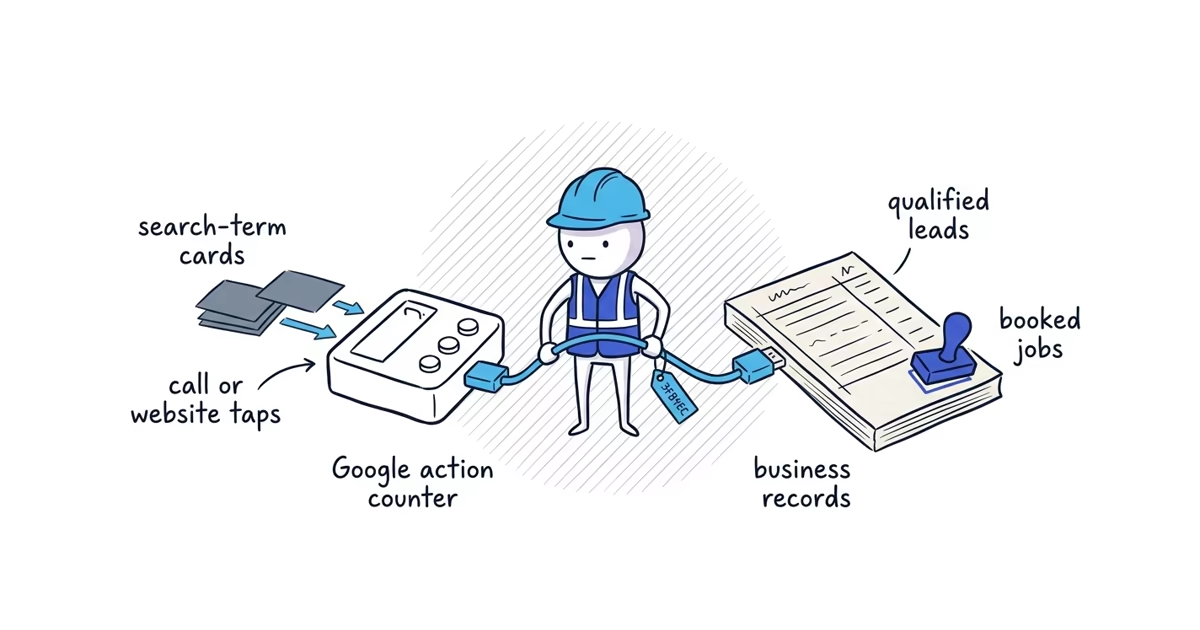
Google Business Profile Performance shows how people found the profile and which Google buttons they clicked. It does not tell you which people became qualified leads, booked jobs, or revenue. The business has to connect those outcomes outside the profile.
Use three measurement layers:
- Discovery: Which search terms caused the profile to appear, and how many profile views Google counted
- Google-reported actions: Call-button taps, website-link taps, and other available profile interactions
- Business outcomes: Qualified calls and forms, estimates, booked jobs, and revenue recorded by the business
Performance is available only for verified profiles. Open it while signed in to the Google Account associated with the profile.
How Google Business Profile search terms and views work
What reported search terms mean
Google’s reported search terms are the queries for which the Business Profile appeared. A term does not prove that the searcher saw the profile, opened it, clicked it, called, or became a lead.
For example, if move out cleaning near me appears in the report, the safe conclusion is:
The profile appeared for this query during the reporting period.
You cannot conclude that a particular form, call, or booked move-out job came from that query. Business Profile Performance and a tagged website link do not provide query-level lead tracking.
Google says search terms update at the beginning of each month and can take up to five days to appear. Record them monthly rather than expecting a live daily keyword report.
The owner cannot directly choose or manage the queries in this report. Use them to spot:
- Relevant demand, such as the main services customers actually request
- Missing demand, where an important real service rarely appears
- Mismatches, where unrelated searches appear often
- Changes worth investigating across complete periods
Do not paste reported phrases into the business name, description, services, review requests, or owner replies. The report is evidence to interpret, not a keyword-stuffing instruction.
What profile views count
Google limits repeat view counting across a day, device, and whether the profile appeared on Search or Maps. A person may therefore be counted a limited number of times depending on how and where they view the profile.
This means profile views are not:
- A raw count of every appearance anywhere on Google
- A guaranteed count of unique people for the whole month
- Directly interchangeable with a number shown in another Google email or report
- Leads
Use profile views as a consistent trend from the same Performance report. Do not build a customer or revenue claim from the number alone.
What profile actions count
Performance reports actions taken on Google, not the completed business result.
| Performance metric | What Google counts | What it does not prove |
|---|---|---|
| Calls | Taps on the Business Profile call button | That the phone rang, connected, was answered, produced a qualified lead, or booked |
| Website clicks | Taps on the profile website link | That the page loaded, a form was completed, a booking occurred, or the visit produced revenue |
| Directions | Requests for directions, when applicable | That the person arrived or became a customer; this metric is generally unavailable for a pure service-area profile with no public address |
| Messages or bookings | Applicable actions through supported profile features | That the request was qualified, completed, or paid |
| Products, menus, or offers | Applicable views or interactions for profiles with those features | A lead or sale by itself |
Performance can include activity from both organic results and Google Ads. It does not provide a clean organic-versus-paid split for every profile metric. If Ads were running during one period, record that fact in the monthly notes instead of treating all movement as organic ranking work.
How to add UTM tracking to Google Business Profile
An ordinary profile link to https://www.yourbusiness.com/ can be mixed with other Google organic or direct website visits in analytics. Add three consistent labels to separate sessions that used the Business Profile website link.
Use this lowercase pattern for a single-location business:
https://www.yourbusiness.com/?utm_source=google&utm_medium=organic&utm_campaign=gbpReplace https://www.yourbusiness.com/ with the real page already used by the profile. The three labels mean:
- Source (
google): The referring platform is Google. - Medium (
organic): The visit is grouped as unpaid search activity rather than a paid campaign. - Campaign (
gbp): The specific link is the Google Business Profile website link.
Keep all three values lowercase. Analytics treats differently capitalized values as different labels, so GBP, Gbp, and gbp can fragment the report.
Do not add a query-specific utm_term. The profile does not tell the website which Business Profile search term belonged to that individual click.
How to test the tagged website link
For a simple homepage with no existing query parameters, the pattern above is straightforward. If the current link already contains ?, tracking values, booking data, or other parameters, use Google’s Campaign URL Builder instead of hand-editing the string.
Test the exact final link before putting it on the profile:
- Open it in a private mobile browser.
- Confirm that it loads the intended business page without an error or unexpected redirect.
- Check the browser address after the page loads. The
utm_source,utm_medium, andutm_campaignparameters should still be present. - Complete only a safe test of the customer path; do not create a false customer enquiry.
- Confirm later that the test session appears under the expected labels in analytics.
Do not change the business domain solely for tracking. Keep the correct customer destination and add the labels to it.
How to find tagged profile traffic in GA4
In Google Analytics 4, open Reports, then Acquisition, then Traffic acquisition. Use these dimensions:
- Session source / medium: Look for
google / organic - Session campaign: Look for
gbp
The source/medium row can include other unpaid Google visits, so use the campaign value to isolate the tagged Business Profile link.
Forms, bookings, calls from the website, or other meaningful events appear only if the website’s analytics setup already records them. UTM labels identify the visit; they do not create form or booking tracking.
How to track calls and booked jobs
UTM labels work on a website URL. They cannot identify a tap on Google’s call button because that customer does not visit the tagged page.
Use a lightweight source field in the normal call, estimate, booking, or customer record. When appropriate, ask how the customer found the business and record a consistent answer such as Google Business Profile. Do not require call recording.
For each call or website enquiry, record only what the owner needs to make decisions:
- Source
- Requested service and location
- Qualified: yes or no
- Estimate sent: yes or no
- Booked: yes or no
- Booked revenue
This is the bridge from Google activity to business results. It also exposes the gaps Performance cannot explain. Twenty call clicks and eight qualified calls are different numbers. Thirty website clicks and six completed forms are different numbers.
Advanced call tracking can involve phone-number, forwarding, identity, analytics, and legal decisions. Review that implementation separately. Do not change the customer-facing phone number or business identity solely to make this worksheet easier.
Monthly Google Business Profile lead sheet
Use one phone-friendly record per complete month for a single location:
Month: __________

DISCOVERY - from Business Profile Performance
Top relevant search terms: ______________________________
Profile views: __________

ACTIONS - from Business Profile Performance and tagged analytics
Call clicks: __________
Website clicks: __________
Tracked website enquiries: __________

OUTCOMES - from call, estimate, booking, and customer records
Qualified calls: __________
Booked jobs: __________
Booked revenue: $__________

One focused change made: ________________________________
Notes: Ads, holidays, closures, weather, staffing, or seasonality
Download or record the data monthly. Do not assign individual leads to the listed search terms, and do not compare a partial current month with a complete previous month.
Lead tracking example for a cleaning business
Clearview Home Cleaning’s June record might read:
Month: June

DISCOVERY
Top relevant search terms: house cleaning near me;
  recurring house cleaning; move out cleaning
Profile views: 410

ACTIONS
Call clicks: 18
Website clicks: 32
Tracked website enquiries: 9

OUTCOMES
Qualified calls: 11
Booked jobs: 7 recurring jobs
Booked revenue: $3,850 first-month booked revenue

One focused change made: Added the tested tagged homepage URL
Notes: Ads ran for 10 days
These numbers show how the fields connect; they are not a benchmark. The owner can say the profile appeared for relevant terms, Google counted 18 call-button taps and 32 website-link taps, and the business recorded 9 web enquiries, 11 qualified calls, and 7 booked jobs.
The owner cannot connect each lead to one reported query or assume every click became contact. Because Ads ran during June, the month is not a pure organic ranking result. The note preserves that limitation without opening a paid-search reporting project.
How to diagnose lead problems from the monthly sheet
Compare complete periods, then find the first weak stage:
- Few relevant search terms or low relevant discovery: The Google Maps ranking guide helps you check relevance, prominence, and the real distance constraint before changing the tracking setup.
- Adequate views but weak call and website actions: Inspect the customer-facing profile and trust decision.
- Actions without qualified calls or website enquiries: The call and website guide helps you test phone routing, response, the linked page, and the enquiry path to find the first leak.
- Qualified leads without booked jobs: Review availability, estimating, follow-up, pricing, and sales operations.
- Booked jobs without useful revenue: Review job economics rather than asking for more profile activity.
Note one focused change in each comparison period. If the owner changes the category, website, phone handling, hours, review process, and Ads budget together, the sheet cannot show which change mattered.
There is no universal good number of views, calls, clicks, or leads. The useful comparison is whether relevant discovery turns into more qualified and profitable work for this business under comparable conditions.
Frequently asked questions
Does Google Business Profile Performance include Google Ads?
Yes. Performance can include activity from organic results and Google Ads, and it does not cleanly separate paid and organic activity for every profile metric. Note when Ads ran so you do not treat all movement as an organic ranking result.
What is a good number of Google Business Profile views or calls?
There is no universal benchmark. Compare complete, similar periods for the same business, then follow views and call clicks through qualified leads, booked jobs, and revenue; a higher Google count is useful only when it produces better business outcomes.
Sources
- google-business-profile
- lead-tracking
- search-terms
- utm-tracking
- google-analytics