How to Check Competitors' Google Business Profile Categories Without Copying Them
Check competitor Google Business Profile categories with Maps and third-party tools, compare similar businesses, and validate every candidate without copying.
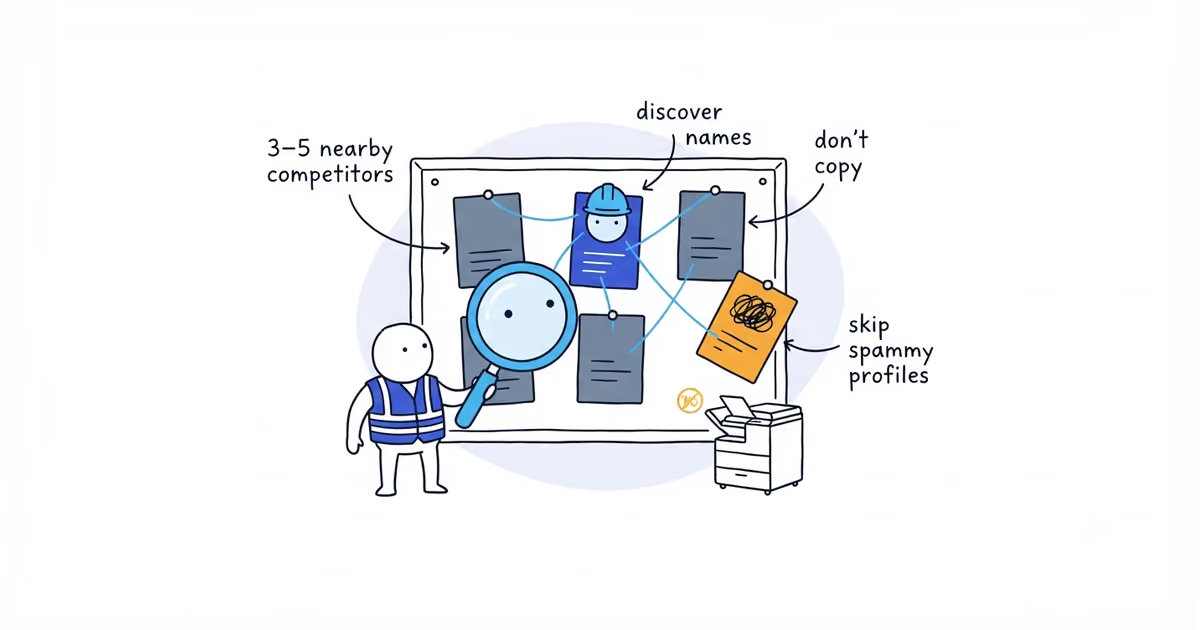
Open three to five legitimate nearby competitors with a similar operating model. Google Maps normally shows one public category on each profile; record that label first. To look for possible additional categories, use a browser tool such as GMB Everywhere, then verify any useful name against a current US category list and your own live account selector.
Competitor research discovers names. It does not decide what your business should select. A category used by every nearby competitor can still be wrong for your operation.
Google guidance checked: July 21, 2026. Tool workflow and public US category names checked: July 21, 2026. Confirm every final name in the live account selector.
Which competitors should you compare for Google Business Profile categories?
Do not start with the first three profiles in the Map Pack. Rank alone does not make a business comparable or correctly categorized.
For each possible comparator, record:
- Location and service market
- Core work and main customer
- Residential, commercial, specialist, or mixed operating model
- Approximate scale or complexity when it materially differs
- Whether the business appears to have a legitimate real-world presence
- Why its operation is similar enough to inform yours
A residential plumber should not copy a large plumbing, HVAC, and electrical company. A house cleaner should not copy a janitorial contractor with overnight facility teams. A window-cleaning specialist should not use a full exterior-cleaning company as its only comparison.
Exclude obvious mismatches before collecting categories. Otherwise the worksheet will give precise answers to the wrong question.
How to find a competitor’s Google Business Profile categories
The visible label on a competitor’s Google Maps profile is the practical starting point. Record the exact spelling, competitor URL, and date. Do not assume that one visible label is the profile’s complete category set.
For possible additional categories, GMB Everywhere says its Chrome extension places primary and secondary categories beside profiles and provides a category audit. PlePer’s category-list tool serves a different purpose: it lets you view names by country and language. Use the extension to inspect a competitor and the list to cross-check a discovered label. Neither tool controls what appears in your account.
A practical collection sequence is:
- Open the competitor’s profile in Google Maps on desktop and copy the publicly displayed category into the worksheet.
- With the same profile open, run GMB Everywhere’s category audit and record any primary and secondary labels it reports.
- Save the Maps URL, tool name, and date beside the result. Repeat the process for every comparator in the same session.
- Search each candidate in PlePer’s United States, English category list, or another current public list. This catches spelling differences and obviously stale tool output.
- Compare the competitor’s website with the label. Note whether it serves the same customer and operates the same kind of business as yours.
- Sign in to your own Business Profile and confirm every candidate in its category selector before making an edit.
If an extension fails, try a clean Chrome profile, disable conflicting extensions, reopen the Maps profile, and record the date of the failed check. You can still complete the comparison with the publicly visible category. Mark additional categories as not collected; do not guess them. Page-source methods are a last resort because Google’s markup changes and old instructions can stop working without warning.
How to audit competitor Google Business Profile categories
Create one row per discovered candidate, not one row per competitor.
| Candidate | Who uses it | Same business model? | Our evidence | Keep/reject |
|---|---|---|---|---|
| Exact category to verify | Comparable businesses and outliers | Yes, partial, or no, with reason | Jobs, team, equipment, licenses where applicable, website, and customer path | Keep for selector review, reject as mismatch, or move the job to Services |
The last two columns matter most. A category repeated by four competitors still fails if it does not describe your business.
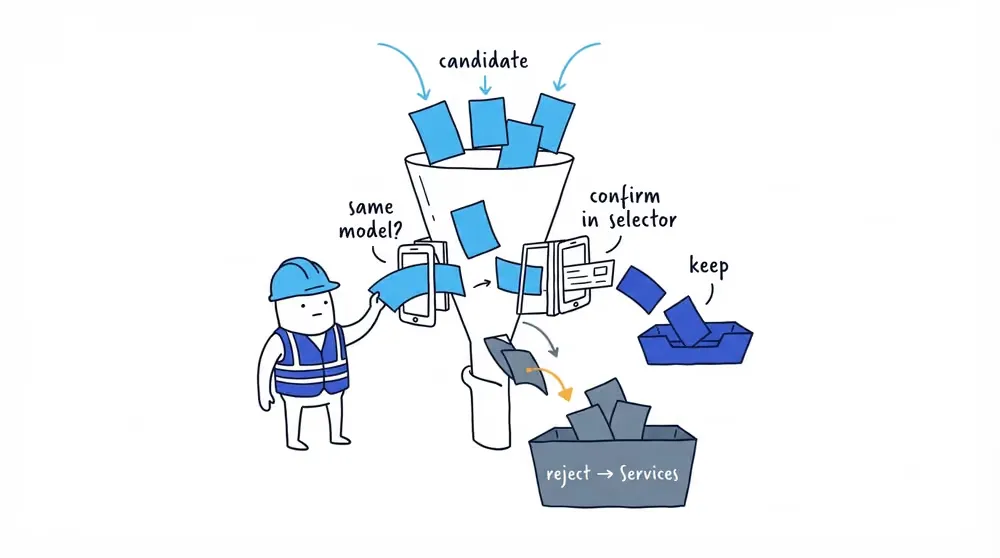
Test 1: This business is a…
Insert the candidate after the sentence “This business is a…”
If the sentence describes a job instead, reject it as a category. This business offers drain cleaning belongs in Services for a general plumber. It does not prove the company is a separate drain operation.
Test 2: ShiftFlow’s accuracy check
Google says categories should accurately describe the business and that businesses should use only a few additional categories. It does not publish the operational checklist below. ShiftFlow recommends looking at several of these signals before accepting a competitor-discovered label:
- A meaningful share of completed work
- Trained team members assigned to it
- Equipment and vehicles supporting it
- Licenses or permissions where applicable
- A website and navigation path matching a real offer
- Intake, estimating, scheduling, and delivery built for those customers
No single signal or percentage is mandatory. The combined facts should make the category a truthful description. One competitor, one webpage, or one desired lead does not do that.
Hypothetical competitor category audit for a plumbing company
Ridgeway is a fictional five-person residential plumbing company. It handles repairs, installations, drains, and water heaters through one team and dispatcher. It does not perform septic work, sell equipment at retail, or operate a separate remodeling division.
The owner selects four nearby businesses for research:
- Competitor A: a similar six-person residential plumber
- Competitor B: a similar repair-and-installation plumber with a dedicated drain crew
- Competitor C: a large plumbing and HVAC company with multiple divisions
- Competitor D: a keyword-stuffed profile whose public information is too thin and inconsistent to establish what business actually operates behind it
Competitor D is excluded before its categories influence the audit. Competitor C remains useful for discovering labels, but its multi-trade model is marked as different.
The completed sheet looks like this:
| Candidate | Who uses it | Same business model? | Ridgeway’s facts | Keep/reject |
|---|---|---|---|---|
Plumber | A, B, and C | A and B yes; C only partly | Describes Ridgeway’s whole team, website, dispatch, and completed-job mix | Keep as primary candidate, subject to the live selector |
Drainage service | B and C | B partly; B has a drain-led operation that Ridgeway does not | Ridgeway performs drain jobs inside its general plumbing operation | Reject for now; keep drain cleaning in Services |
Septic system service | C | No | Ridgeway does not accept septic work | Reject |
Hot water system supplier | A and C | No clear match | Ridgeway installs water heaters but does not operate as an equipment supplier | Reject; keep installation and replacement in Services |
The most frequently discovered additional categories do not survive. That is a successful audit. Its purpose is to improve the decision, not increase the category count.
Once the audit has reduced the list to defensible candidates, the business category guide helps choose the primary and additional roles and keep job-level terms in Services before the profile is edited.
Which competitor category data should you reject?
Spam and keyword-stuffed names
A profile may rank while violating representation rules or using an inaccurate name. Its visibility does not validate its categories. Exclude it when the real business cannot be identified or compared responsibly.
Miscategorization
Owners and agencies make mistakes. A competitor may have selected categories for desired leads, filled available slots, or left old categories after the business changed. Repetition is a reason to investigate a candidate, not proof.
Different specialties and scale
A company with dedicated drain, termite, commercial, snow, or window teams can truthfully use categories a general operator cannot. Record the operational difference beside the category.
Franchises, multiple locations, and complex businesses
Large or multi-location companies may have structures, teams, departments, or eligible profiles that do not match a single local business. Do not copy the visible result without understanding the underlying operation.
Ineligible setups
Duplicate profiles, virtual offices, nominal departments, and other questionable setups do not create a model to follow. Exclude them. Do not recreate the setup to gain another primary category.
Does an unused competitor category reveal a ranking gap?
If no competitor uses a category, it may be irrelevant, unavailable, poorly understood, or simply wrong for the market. Absence is not a ranking opportunity by itself.
Use the selector and business evidence in the same order as any repeated candidate. A valid overlooked category still needs to describe the company. A category nobody uses is not valuable when the business cannot truthfully claim it.
If category research began because Maps visibility is weak, the Google Maps ranking guide helps separate category relevance from distance and prominence so the owner can choose the next fix for the actual constraint.
Competitor Google Business Profile category checklist
The research is complete when all six statements are true:
- Three to five legitimate, sufficiently comparable businesses were selected.
- Visible primary and tool-discovered possible additional categories were recorded with the source and date; collection failures were marked instead of guessed.
- Every retained candidate was confirmed in the live US selector.
- Every candidate passed the business-is test.
- Every retained category accurately describes the operation after reviewing relevant evidence such as completed work, team capability, equipment, licenses where applicable, website, and customer path.
- Jobs and mismatched business types were rejected or moved to Services.
Record the current categories before applying the result. Google may ask for reverification after a category change, so make only the evidence-backed correction without stacking unrelated major edits.
Competitor research should leave the owner with fewer, better-supported candidates. It should never replace the decision about what the business actually is.
Competitor Google Business Profile category FAQs
Can you see all of a competitor’s categories in Google Maps?
Google Maps normally shows one public category on the profile, not necessarily its complete category set. A third-party extension may reveal possible additional categories, but its output can be incomplete or stale.
Which tool can find competitor Google Business Profile categories?
GMB Everywhere can surface possible primary and secondary categories beside a Maps profile. PlePer can cross-check names by country and language; neither tool is an official selector or policy source.
Should I copy categories from top-ranking competitors?
No. Use competitors to discover candidate names, then confirm each one in your own selector and reject anything that does not accurately describe your business.
Sources
- how-to-check-competitor-google-business-profile-categories
- find-competitor-google-business-profile-categories
- competitor-gbp-category-tool
- see-competitor-additional-categories
- gmb-everywhere-categories
- google-maps-competitor-categories