How Do I Write a Local Landing Page?
Learn how to write a local landing page using a service-area page template built from real services, local work, coverage, proof, and booking details.
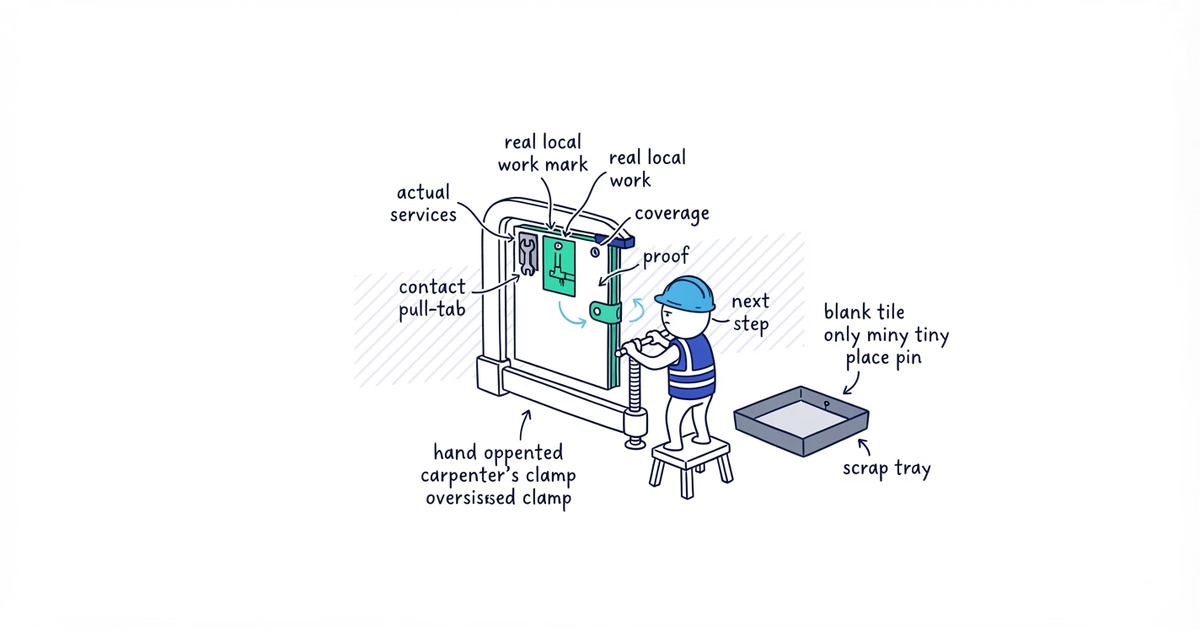
To write a local landing page, build from a real city evidence pack, not another page with the place name changed. State the service, city, actual work, and next step. Then add available services, one local job, representative coverage, proof, and practical booking details.
If you cannot support one section that is meaningfully specific to the city, do not publish a standalone page yet. Keep the city on the broader service-area page until you have the evidence.
This guide produces one complete page draft. It does not choose which cities deserve pages. If that decision is still open, use the city-page qualification guide to test serviceability, economics, demand, and local proof before you start writing.
Google Search, image, and Business Profile guidance checked: August 12, 2026 (United States).
Before you start writing
Open the city’s evidence pack beside a blank document. You need:
- The primary trade or service and the city
- Services customers can actually book there
- One completed local job or another useful local module
- Representative neighborhoods or ZIP areas genuinely served
- Approved job photos and accurately attributable reviews, when available
- Real scheduling, travel, minimum-charge, availability, or service limits
- A working phone number, estimate form, or booking path
- Existing service pages and the broader service-area page
Do not start with keywords or another city’s copy. The evidence decides what the page can say.
The example below uses Clearline Plumbing, a fictional Austin-based plumber serving Round Rock. Its project, services, and wording are instructional examples, not a real business case. Use the structure, then replace every fact with your own records.
The local landing page blueprint
Build the page in the order a customer makes the decision:
| Page section | Question it must answer |
|---|---|
| First screen | Do you serve my city, handle my kind of job, and give me a next step? |
| Services | Can you handle this specific problem here? |
| Recent local work | Have you done work like mine in this area? |
| Coverage | Will you come to my part of the city? |
| Proof | Why should I trust the claim? |
| Practical questions | Is there anything I need to know before booking? |
| Contact action and links | What do I do now, and where can I get more detail? |
Pages can share this layout, but not interchangeable evidence, coverage claims, and project stories.
1. Write the page promise first
Input: The city, primary service intent, service list, operating details, customer action, and current website pages.
Action: Write one sentence that defines the page’s job. Use this formula:
Help a [city] [customer type] confirm that we handle [service need], see [relevant evidence], and [contact action].For the example plumber:
Help a Round Rock homeowner confirm that Clearline handles the plumbing problem, inspect local work and service details, and request service.
This sentence is for the writer, not the page. It prevents a general plumbing guide or collection of city keywords.
If another page helps the same customer with the same city and service, improve or merge into it.
Output: One page promise and one confirmed page owner.
This step is complete when: The promise names the customer, city, service need, evidence, and action without mentioning rankings.
If another page has the same promise: Stop and use the existing page. A new URL is not progress when it duplicates an existing destination.
2. Draft the first screen
Input: The page promise, city, available services, one useful operating detail, and the primary contact action.
Action: Write one H1 and two or three opening sentences. The first screen must contain:
- The service or trade and city
- A direct statement that the business serves the city
- The main services available there
- One operating fact useful to the customer
- One phone, estimate, or booking action
Use this fill-in block:
H1: [Service or trade] in [City, State]

[Business] provides [services] for [customer type] in [city]. Our team serves the area [truthful operating detail]. [Primary contact action] for [information needed to confirm or book the job].
The fictional Round Rock version reads:
Plumbing Services in Round Rock, TX
Clearline Plumbing provides leak repair, drain clearing, water-heater work, and fixture repair for homeowners in Round Rock. Our team serves the city from our Austin operation under our normal scheduling and minimum-charge policy. Call [phone] or request an estimate with your address and job type.
That opening confirms coverage without pretending there is a Round Rock office or making unsupported best, 24/7, or response-time claims.
Output: A first screen that answers coverage, service, and next action.
This step is complete when: A customer does not have to scroll to find out whether you serve the city or how to contact you.
If your opening says only “We proudly provide quality service in [city]”: Return to the evidence pack. Add an actual service, operating detail, and customer action.
3. Add only the services available in the city
Input: The verified city service list and existing service-detail page URLs.
Action: Group the services into a short, scannable section. Give each one a plain description of the work the team handles. Link the service name to a deeper service page when one exists instead of copying the full service guide here.
For Round Rock, the illustrative list is:
- Leak detection and repair: Inspect visible or suspected leaks, identify the source, and repair the affected plumbing when it is within scope.
- Drain clearing: Clear common household drain blockages and identify when the problem needs a different repair.
- Water-heater work: Diagnose, repair, or replace residential water heaters within the models and job types the company accepts.
- Fixture and toilet repair: Repair or replace supported faucets, toilets, and household fixtures.
It omits commercial plumbing and guaranteed emergency response because neither is in the evidence pack. A service added for keywords can produce a call the business cannot fulfill.
State a city-specific limit once when it matters. For example: “Emergency response is not guaranteed in Round Rock; current availability is confirmed when you call.” Do not repeat the city name in every service description.
Output: A truthful city service section with clear paths to deeper detail.
This step is complete when: Every listed service can be booked in the city now, and the section does not duplicate an existing service page.
If you cannot confirm a service: Delete it. If the offering really changes by city, explain the difference instead of hiding it.
4. Turn one completed job into the local-work section
Input: A real completed job with customer privacy and photo permission resolved.
Action: Write the project in four parts:
- Problem: What did the customer need fixed?
- Work: What did the team inspect, repair, install, clean, or replace?
- Decision or constraint: What choice, condition, or limit shaped the work?
- Outcome: What was completed and checked?
Use this fill-in block:
## Recent [service] work in [city]

A [city or neighborhood, never a private address] customer contacted us about [problem]. We [work performed]. Because [relevant condition or decision], we [truthful response]. We completed the work by [outcome and check].
The fictional example becomes:
Recent Water-Heater Work in Round Rock
A Round Rock homeowner found water around an aging tank water heater. The team inspected the tank and connections, confirmed that the tank had failed, removed it, and installed the selected replacement. The customer needed a scheduled replacement rather than an emergency-arrival promise. The crew tested the new connections and hot-water delivery before completing the visit.
Place approved photos beside the facts they show. A caption might read “Replacement tank water heater after installation and connection testing.” Alt text should describe what is visible, such as “Installed residential tank water heater with new supply connections.”
Do not publish the customer’s address, identifying documents, faces, license plates, access codes, or job details they did not approve.
Output: One concrete local-work module with supporting photo placements, when available.
This step is complete when: The section describes actual work, a real decision, and an outcome without exposing the customer.
If you have no publishable project: Use another truthful, non-copyable local module if it helps the customer. Otherwise return the city to hold. Never generate a case study from assumptions.
5. Explain coverage and neighborhoods
Input: The real service boundary, representative neighborhoods or ZIP areas, and any travel, scheduling, or job-type limits.
Action: Write one short coverage paragraph. Mention approximately three to six representative areas in a sentence or short list, then tell customers how to check an address outside those examples.
Three to six is a Playbook readability recommendation, not a Google rule. It helps customers orient themselves without a place-name dump.
The Round Rock example reads:
Where We Work in Round Rock
We regularly schedule work in Forest Creek, Teravista, Behrens Ranch, and downtown Round Rock. These are examples, not the full service area. If your neighborhood is not listed, send your address and job type so we can confirm coverage and current availability.
Only name areas truly served. Do not research neighborhood names just to insert them. A long list does not prove local experience.
Output: A readable coverage section with a clear confirmation path.
This step is complete when: Every named area is genuinely served and none implies a local office the business does not have.
If neighborhood coverage is uncertain: Use accurate city or ZIP-level language. Specificity is useful only when it is true.
6. Place proof and answer practical questions
Input: Accurate reviews, approved photos, applicable credentials, and questions customers ask before booking in this market.
Action: Put proof next to the claim it supports. A review about a Round Rock water-heater job belongs near the local project or contact section. A license belongs beside a claim that requires it. Job photos belong with the work shown, not in a generic gallery with no explanation.
Reproduce reviews accurately and identify their source. Do not edit wording to add a service or city the customer did not mention. If the business has no Round Rock review, use another truthful proof item. A business-wide review may still be shown as a business review, but it must not be relabeled as Round Rock evidence.
Then add two to four questions that remove real booking obstacles. For the example page:
Do you charge extra to travel to Round Rock?
Our normal minimum-charge policy applies in this instructional example. Send the address and job type when requesting service so the business can confirm any charge before scheduling.
Do you provide emergency plumbing throughout Round Rock?
Emergency response is not guaranteed in this example. Call with the problem and address to confirm current availability.
What should I send when requesting a water-heater estimate?
Send the property address, a description of the problem, and clear photos of the water heater and surrounding connections when it is safe to do so.
Use the real business’s answers. Reject questions about city history, weather, or whether the area is “a great place to live.”
Output: Contextual proof and a short practical FAQ.
This step is complete when: Every proof item is accurate and every question could change whether or how the customer contacts the business.
If an answer is unknown: Ask the owner before drafting it. If no local review or photo exists, use other proof rather than inventing or relabeling one.
7. Add the final action, links, and publication test
Input: The finished copy, primary action, relevant service pages, broader service-area structure, and a phone for testing.
Action: Close with one clear customer action. Ask for the information needed to handle the enquiry.
For the example:
Request Plumbing Service in Round Rock
Call [phone] or request an estimate with your Round Rock address, the plumbing problem, and any useful photos. We will confirm whether the job is within scope, current scheduling, and the applicable minimum charge before booking.
Add contextual links where customers need more detail. Link water-heater repair and replacement to that service page. Link back to the broader service area where a customer needs to check another city. Do not paste a footer-sized block of city links into the copy.
Open the draft on a phone. Test the phone number, form, and booking path. Check that headings are readable, photos load sharply without pushing text off-screen, captions match their images, and the primary action is visible without hunting.
Output: One review-ready and functionally tested service-area page draft.
This step is complete when: The page passes the checks below and every customer action works on mobile.
If anything fails: Do not publish. Fix the action, image, page ownership, or content evidence. Return the city to hold when the failure cannot be fixed truthfully.
Run the publication acceptance test
Customer use
- The first screen states the service, city, actual coverage, and next action.
- Customers can find services, real work, coverage, proof, and booking answers.
- The phone, form, or booking path works on mobile.
Truth and evidence
- Every service, job, review, photo, credential, availability, charge, and timing claim has a source.
- No private customer detail or unapproved image is exposed.
- The page does not imply a storefront, local office, separate team, or Business Profile that does not exist.
Distinct customer value
- Remove the city name. At least one module still identifies this market through real work, coverage, or operating detail.
- The page is useful as a destination; it does not exist only to send the visitor to the same generic service page.
- A shared layout has not become shared interchangeable copy.
Google’s spam policies describe doorway abuse as pages created for similar searches that lead through less-useful intermediate pages, including substantially similar pages. The policies separately list blocks of text naming cities or regions to rank for as keyword stuffing. The test above prevents the city page from becoming an empty intermediate page or a place-name list written for search engines.
Page structure and function
- One page owns the city-service intent.
- Contextual links lead to relevant service detail and the wider service-area structure.
- Photos are relevant, sharp, captioned, and have descriptive alt text.
- The contact action works on a real phone.
Pass all four groups before moving to metadata and applicable technical configuration. Once the page passes, use the local metadata guide to turn its real promise into a distinct title and accurate description. If the page fails, rewrite the failed section, merge it into an existing page, or return the city to hold. Publishing is not the successful outcome; a truthful page a customer can use is.
Frequently asked questions
Do city pages need a minimum word count?
No. Write enough to answer the customer’s service, coverage, proof, and booking questions with verified details. Adding filler to reach a word count does not make a weak page useful.
Can I publish a city page without a local review?
Yes, when real work, coverage details, operating information, or other accurate proof still make the page useful. Do not relabel a business-wide review as a city-specific review.
Should every city page include a map?
No. Add a map only when it accurately helps customers understand a real location or service boundary. A map does not turn a service area into a staffed office or make an otherwise interchangeable page distinct.
Sources
- local-landing-pages
- service-area-pages
- city-pages
- location-page-content
- local-seo