What Photos Should I Add to Google Business Profile?
Choose Business Profile photos that answer five customer questions about identity, team, work, results, and local experience while protecting customer privacy.
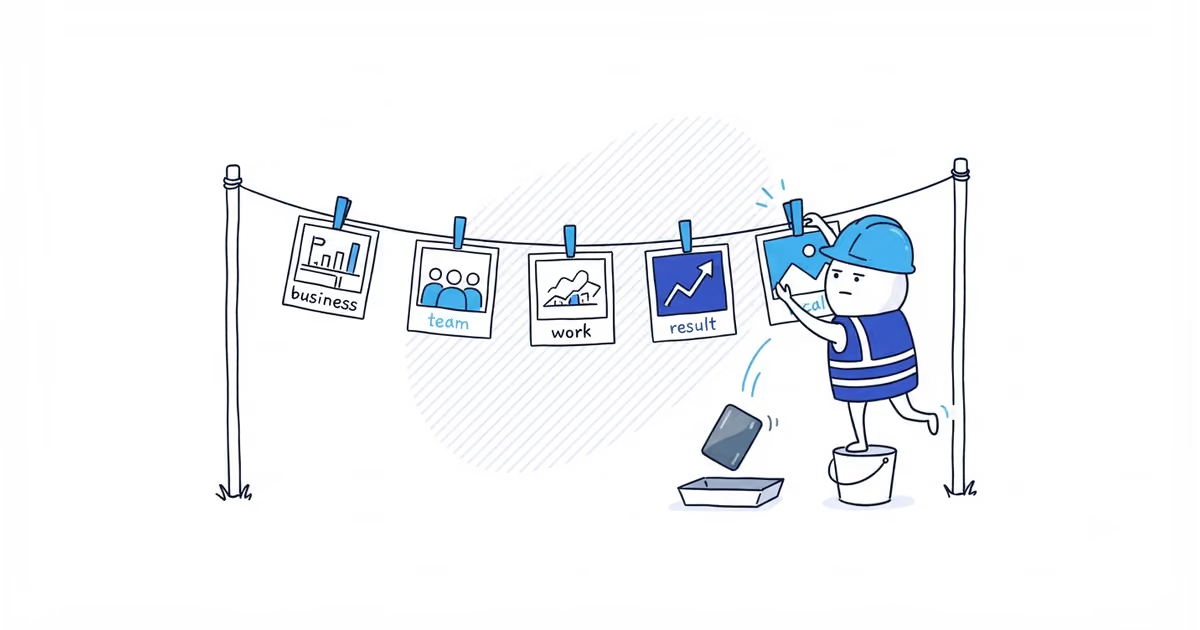
Add real photos that answer five questions a customer is already asking: Is this the business I called? Who may arrive? Does it do my kind of job? What result can I expect? Does it really work around here?
For most home-service businesses, that means an accurate logo or cover image, the owner or team at work, a recognizable vehicle or relevant equipment, work in progress, and representative completed work. Use only photos the business has permission to publish, and remove customer details that should stay private.
Photos and videos cannot appear until the profile is verified. If needed, finish verification before diagnosing the gallery.
Google Business Profile photo checklist
Use this worksheet against the photos already on the profile and the candidates on your phone.
| Customer question | Best proof to select | Home-service example | Reject the image when |
|---|---|---|---|
| Is this the same business I called? | Current logo, uniform, or marked vehicle | The van and work shirt use the same trading name as the profile | Branding is old, borrowed, temporary, or unrelated |
| Who may arrive? | Current owner or team member doing normal work | A cleaner setting up safely at a real job | The person has left, did not agree to publication, or is AI-generated or stock |
| Does it perform this service? | Work in progress with the right equipment and context | A drain camera being used, not sitting alone on a bench | The tool or scene could belong to any trade or business |
| What result can I expect? | Clear, representative completed work | A repaired and tidied boiler area | The result belongs to someone else, is heavily altered, or implies a guarantee |
| Does it really work around here? | Genuine local job context without private details | A typical local property and normal regional conditions | It exposes an address or is being used as a geotag ranking trick |
Before publishing, ask one last question: would you be comfortable showing this photo to the customer whose property or family appears in it? If not, keep it off the profile.
Add current business and vehicle photos
Start with identity. A marked vehicle, recognizable uniform, or team member using the current business name helps a customer connect the listing with the person who arrives. Truck photos work when the vehicle is genuinely used by the business and has accurate branding; a stock van or another company’s vehicle does not.
Google lets an owner add a logo and choose a cover photo, but Google may still show another cover or reorder the gallery. Check that the preferred image is live. If it is, do not keep uploading copies just because it is not first.
Add current team photos
Team photos work when they show current team members doing real work safely. A solo owner should show the owner at work rather than stage a larger crew. Do not use stock workers, AI-generated people, former team members, or heavily altered headshots as identity proof.
Get permission from identifiable people before publishing. If a customer, child, or bystander appears, choose another angle, crop the person out without changing the work, or keep the image private.
Add jobsite photos with tools in use
A close-up of a pressure washer, drain camera, meter, or paint sprayer only proves that you have the tool. Show it being used in a real job:
- The team member is performing the service safely.
- The part of the property being worked on is understandable.
- The image represents a core service customers actually request.
- No document, screen, address, key, code, or private condition is visible.
Cover the main work instead of uploading 20 near-identical photos. Use jobsite photos when they explain the process or result and pass the permission, privacy, and safety checks.
Add completed-work photos that show a clear result
Completed-work photos should show this business’s work and represent the normal service. Do not present an exceptional property as the result every customer will receive.
Before-and-after images can work well when the comparison is fair. The separate before-and-after photo guide covers matching angles, truthful editing, privacy, and the risk that Google may separate two gallery images.
For a single completed image, a simple test is enough: could a stranger identify what was completed without a long sales caption or a misleading edit?
Use local job photos as customer proof
A real job photo can show experience with local property types, weather, materials, or working conditions. It does not create a business location. Do not expose a street number, force in a city name, or edit GPS metadata as a ranking tactic. See the photo and Maps ranking guide for the evidence.
A service-area business does not need fake storefront photos. Emphasize the team, vehicle, equipment, work, and results. A genuine customer-facing shop may also show a truthful exterior and interior.
Google Business Profile photo requirements
Google currently gives these photo requirements:
- JPG or PNG
- Between 10 KB and 5 MB
- Recommended resolution of 720 by 720 pixels
- Minimum resolution of 250 by 250 pixels
- In focus and well lit
- No significant alterations or excessive filters
- Representative of reality
A clear phone photo of actual work is better proof than polished stock. Professional photography is optional; truth and clarity are not.
Google Business Profile photo selection example
Bright Room Cleaning has 18 candidate images after a residential deep clean. The folder includes duplicate room shots, a customer standing in a doorway, a visible house number, two photos with an old logo, a former team member, isolated bottles and tools, two current team-at-work images, and three completed-room images.
The owner selects the current logo, a permitted team member preparing equipment, one team-at-work image without the customer or address, and two completed-room images that show different service contexts.
The customer image and house-number image stay private. The old-logo and former-team-member images are rejected. The duplicates and isolated bottles add nothing the selected images do not already explain.
After uploading, the owner opens the profile in Search and Maps the way a customer would. All five images are public, although Google shows a completed room instead of the preferred logo first. The upload worked, so the owner leaves it alone instead of creating duplicates to fight the order.
How to check if your photo gallery is complete
The gallery is ready when a customer can recognize the business, see who may arrive, understand the core work, and inspect a representative result.
Use the photo count and cadence guide to decide when another image would add useful proof.
Frequently asked questions
Can I add photos taken at a customer’s home?
Yes, when the business has permission to publish them and the image does not expose the customer, address, documents, keys, codes, screens, plates, or other private details. When permission or privacy is unclear, keep the photo off the public profile.
Why is Google not using my selected cover photo?
Choosing a cover shows a preference, not a guaranteed display position. Confirm that the image is accepted and public. If it is live elsewhere in the gallery, the problem is presentation rather than upload failure.
Sources
- google-business-profile
- profile-photos
- team-photos
- jobsite-photos
- local-proof
- home-services