
Free estimate template
Free Contractor Estimate Template
One worksheet, from business details through customer acceptance. Open it in Excel or Google Sheets for automatic totals, or use the fillable one-page PDF for a quick estimate in the office or on the jobsite.
Need guided calculations and a finished PDF? Use the online estimate generator .
Workforce management for shift-based teams
Time Tracking • Shift Scheduling • Time Off Management
Free 14-day trial · No credit card required
Download the contractor estimate template in Excel or PDF
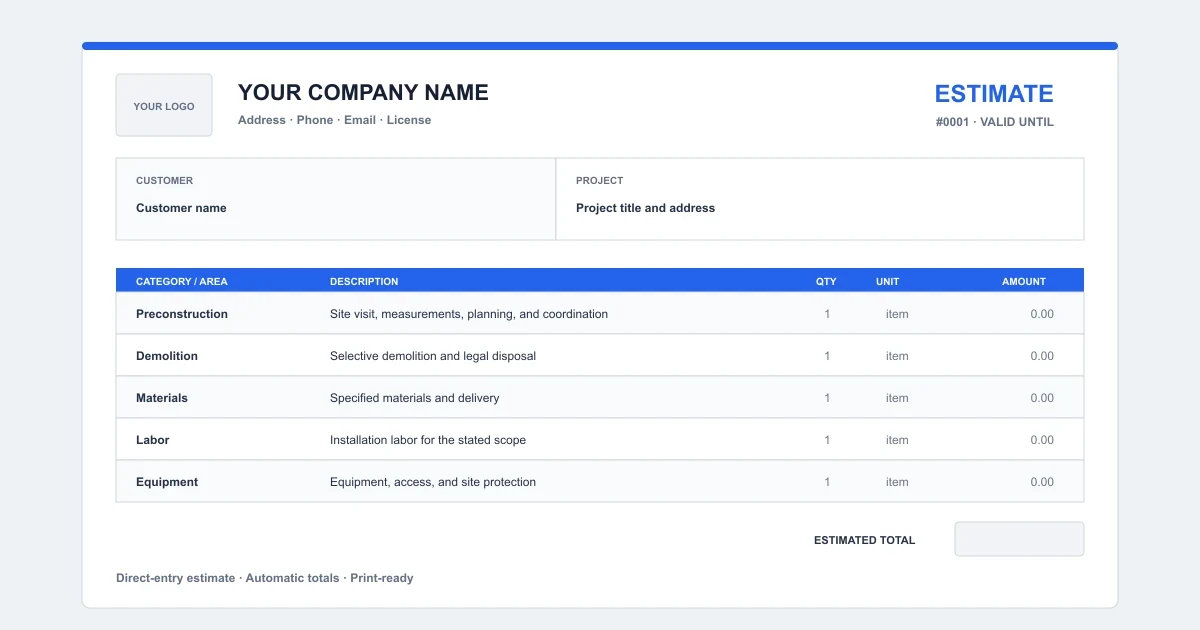
The contractor estimate template lays out a full job on one sheet: business and customer details, a line-item scope for labor, materials, equipment, permits, and allowances, then automatic subtotal, tax, total, and deposit.
Download it once and reuse it for every job — no account, no email address, and nothing to install. Prefer to build the estimate in your browser and export a finished PDF? Use the online estimate generator .
What’s inside the contractor estimate template
- One worksheet from business details through customer acceptance
- 10 editable scope rows for labor, materials, equipment, permits, and allowances
- Automatic line amounts, subtotal, tax, total, and deposit
- Space for scope notes, exclusions, schedule, payment terms, and warranty
How to fill out the contractor estimate template
- Download. Choose Excel for automatic calculations or the fillable PDF for a quick manual estimate.
- Fill in the estimate. Replace the yellow cells, edit the scope rows, and enter the quantities and prices.
- Review and send. Confirm the totals and terms, then print or export the estimate as a PDF for the customer.
Review the complete contractor estimate guide before sending the document.
What to include in a contractor estimate
- Record the job. Identify the customer, property, proposal basis, and validity dates.
- Define the scope. Organize the work by phase, trade, material, labor, and responsibility.
- Separate uncertainty. Mark included allowances, optional upgrades, and excluded work clearly.
- Build the price. Add quantities and customer prices, then review subtotal, tax, and deposit.
- Set the terms. State schedule, payment, warranty, change-order, and concealed-condition terms.
- Review and send. Check the customer-facing document before acceptance or export.
The online generator and spreadsheet follow this same sequence. Choose the format that fits the job; the customer-facing estimate should contain the same scope, quantities, price, and terms.
Excel, Google Sheets, or PDF: which format should you use?
- Excel
- Edit and auto-calculate. Totals update as you change quantities, unit prices, the tax rate, and the deposit.
- Google Sheets
- Upload the XLSX to Google Drive to fill it out in any browser and share it with the crew. The formulas carry over.
- Fillable PDF
- A one-page form for a fast quote in the office or on the jobsite. Type into the fields or print it — no calculations.
Contractor estimate template FAQ
Is the contractor estimate template really free?
Yes. The Excel workbook and fillable PDF can be downloaded without creating an account or providing an email address.
Does the Excel estimate template calculate totals?
Yes. The workbook calculates each line amount, subtotal, tax, estimated total, and deposit. Review the quantities, prices, tax rate, and deposit rate before sending the estimate.
Can I open the template in Google Sheets?
Yes. Upload the XLSX file to Google Drive and open it with Google Sheets. The formulas carry over; confirm the print layout and number formats after conversion.
What line items are on the contractor estimate?
The estimate has editable scope rows for labor, materials, equipment, permits, and other construction work. Each row has a quantity, unit price, and automatic line amount.
Can I customize the template with my logo and business details?
Yes. In Excel or Google Sheets, edit the business name, address, and contact cells and add a logo from the Insert menu. The fillable PDF has business, license, and contact fields.
Is the PDF fillable?
Yes. Type into the business, customer, scope, pricing, terms, and acceptance fields with a compatible PDF reader, or print the one-page form and complete it by hand.
Is this template a contract or tax invoice?
No. It creates a commercial estimate or quotation. It is not a final construction contract or tax invoice, and local requirements still need to be reviewed.
Explore more free tools
Business Quote Generator
Create a customer-ready quote with scope, pricing, validity, terms, and acceptance.
Construction Quote Generator
Build a construction quote with scope, allowances, options, deposits, and payment terms.
Service Proposal Generator
Turn a client need into a clear proposal with scope, options, pricing, and acceptance.
Bill of Materials Generator
Calculate batch quantities, scrap, and material cost, then export CSV or PDF.
Remodeling Estimate Generator
Build room-by-room scope and customer pricing, then download a professional remodeling estimate PDF.
Remodeling Estimate Template
Download a free remodeling estimate template for Excel, Google Sheets, or fillable PDF with line-item scope, automatic totals, tax, deposit, terms, and customer approval.